Move from Mermaid
open-diagram reads Mermaid flowcharts as they are, and lays them out again with the same measuring and layout checks as any other diagram.
Draw your file as it is
pip install open-diagram
open-diagram draw flow.mmd
It writes flow.svg and flow.png next to the file. The PNG is saved through Chrome, Chromium
or Edge; add --no-png for the SVG only. If the layout has a problem, the command names it and exits with an error.
Or let your agent do it
The MCP server's check and draw tools take Mermaid text as well as JSON. Add the server, paste
your flowchart, and ask for it drawn with open-diagram.
claude mcp add open-diagram -- uvx --python 3.12 --from "open-diagram[mcp]" open-diagram-mcpThe same flowchart, three ways
The photo upload flow from the Compare page: three subgraphs, ten boxes and ten lines.
Mermaid
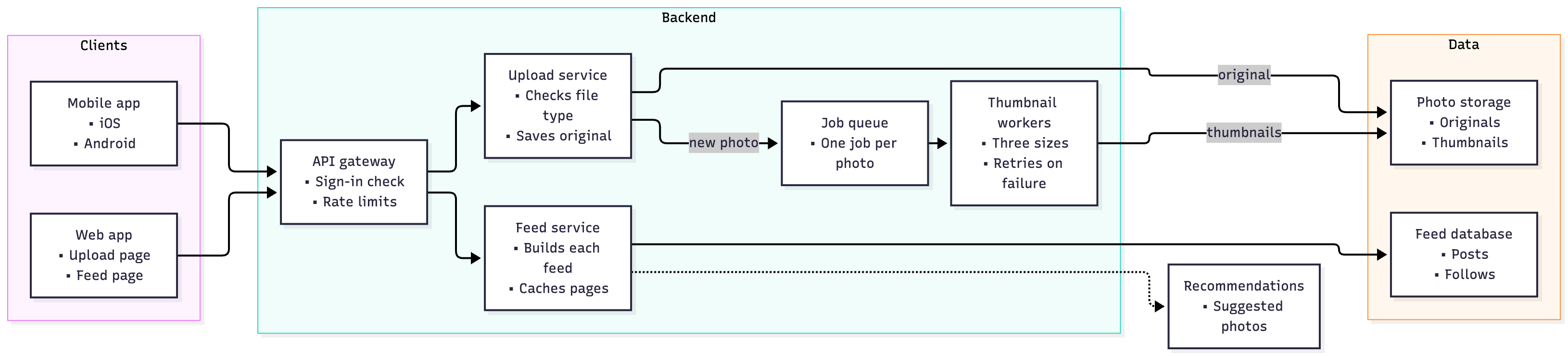
Mermaid CLI 12.2.0, default settings. Source
open-diagram, from the same Mermaid file
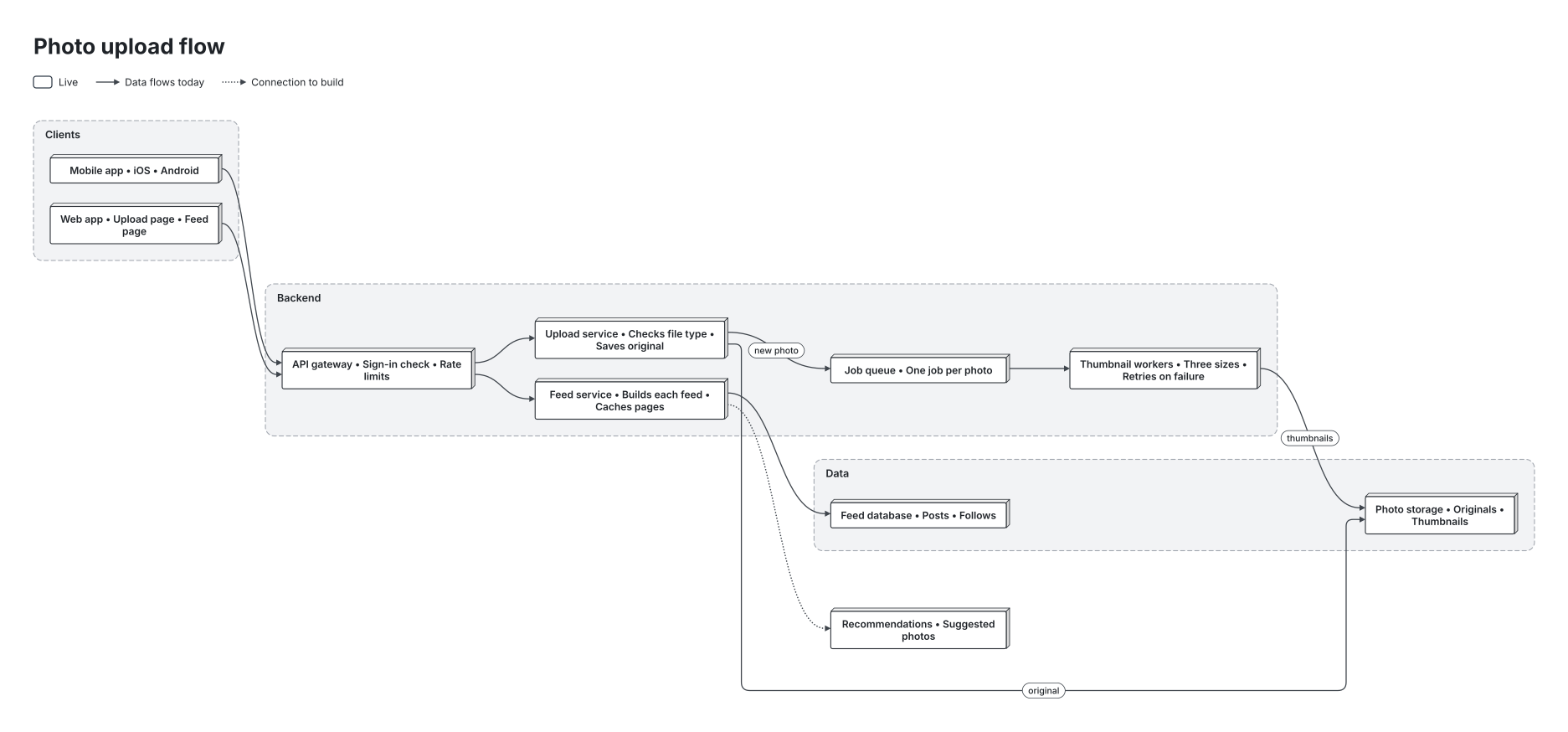
open-diagram draw photo-upload.mmd --title "Photo upload flow". Each <br/> became a space, so the bullet lines in each box run together.
open-diagram, from the flow written in JSON
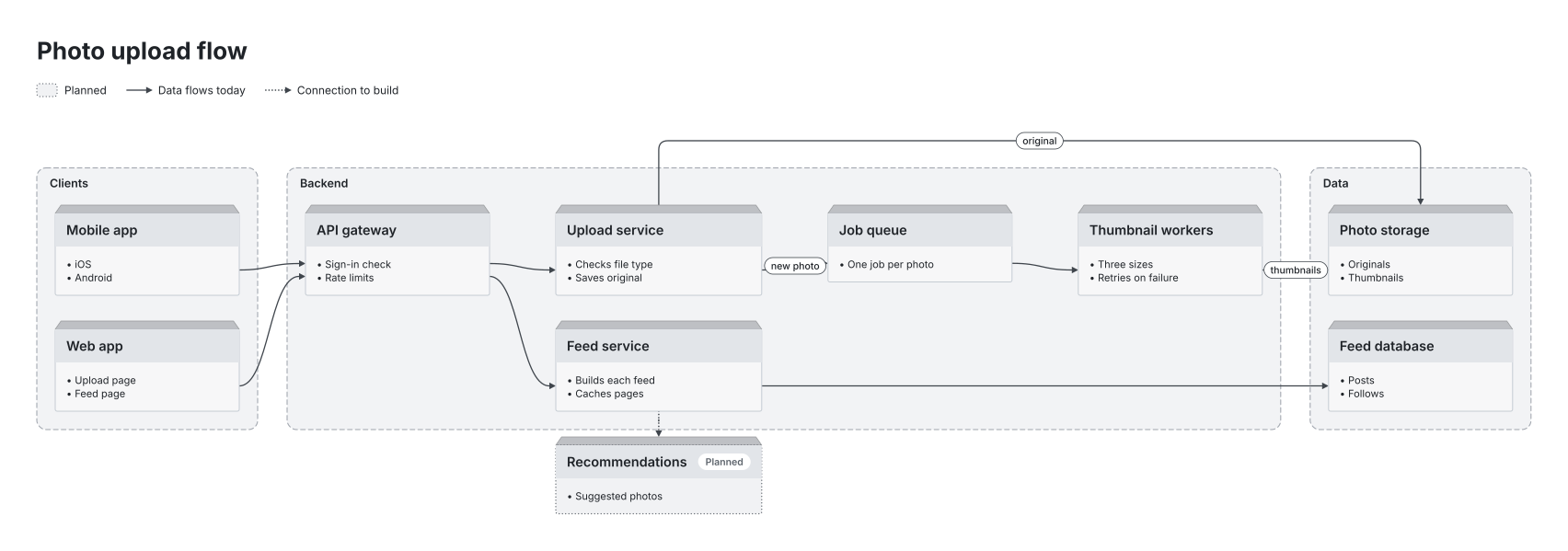
open-diagram draw photo-upload.json. Each box keeps its bullet lines, and the columns are chosen in the file. Source
What carries over
flowchartandgraph, withLR,TDorTB.- Nodes in any bracket shape, with or without quotes.
- Chains (
A --> B --> C) and&(A & B --> C). - Line labels:
-->|text|,-- text -->,-. text .->and== text ==>. - Dotted lines (
-.->) become connections still to build, drawn dotted. - Each top-level
subgraph…endbecomes a shaded group. - A class named after a state sets that state:
A:::buildingorclass A,B planned. The states are live, building, trial, planned and retiring. - A
title:in the front matter. Without one the title is “Flowchart”, and--titlesets it. %%comments, and;between statements.
What changes
- Every node is drawn as the same box. Diamonds, circles and other shapes are not kept.
<br/>becomes a space, so a label written on several lines is drawn as one line, wrapped to fit.- Thick lines (
==>), lines with no arrowhead (---), circle and cross ends (--o,--x) and two-way arrows (<-->) are all drawn as ordinary one-way arrows. RLis drawn left to right, andBTtop to bottom.- A subgraph inside another subgraph is merged into the outer one.
- Class names that are not states are ignored, and so are styling lines:
classDef,style,linkStyle,clickanddirection. - Markdown strings and icons such as
fa:fa-carare shown exactly as typed. - open-diagram chooses the layout. Boxes go in steps by their longest path, and lines that skip a step or point backwards run in a lane above or below the picture.
What it does not read
- Other Mermaid diagram types, such as
sequenceDiagram. The command stops and names the line. - The newer shape syntax,
A@{ shape: … }. The command stops and names the node. - D2 files. open-diagram has no D2 reader.
Rewrite it in JSON
JSON keeps each box's lines as a list, and lets you choose where every box goes. One box, two lines and one group from the photo upload flow, shortened:
Mermaid
subgraph Backend
  upload["Upload service<br/>• Checks file type<br/>• Saves original"]
end
upload -->|new photo| queue
feed -.-> recs
JSON
{"id": "upload", "title": "Upload service",
 "sections": [{"text": "• Checks file type\n• Saves original"}]}

{"from": "upload", "to": "queue", "label": "new photo"}
{"from": "feed", "to": "recs", "kind": "planned"}

{"label": "Backend",
 "members": ["gateway", "upload", "feed", "queue", "workers"]}
Every JSON key is in the README. The full files: photo-upload.mmd and photo-upload.json.