Layered stack diagram with retiring parts: what an AI agent drew
For anyone who wants a stack drawn as layers with its retiring parts marked, this page records one run of an AI agent doing it with open-diagram. Both drafts passed the check; the second removes three arrows the picture did not need.
Updated
What was asked?
The user typed one sentence:
Show this stack as layers, with the parts we are retiring marked.Maplestave is an invented company that sells tickets for small theatres. Its stack, from the top, is apps (booking website, box office app, kiosks), services (seat maps, payments, e-tickets, printed tickets), data (main database, reporting copy, sales archive) and hosting (cloud servers, office server). Maplestave is retiring the kiosks, printed tickets, sales archive and office server.
What did the first draft get wrong?
Nothing the check measures: it reported 0 layout problem(s).
The agent skill says columns can read top to bottom for layers. In JSON, that is one column of four layers, each with its parts in a row. The four retiring parts carry "status": "retiring", which draws them in red and adds "Retiring" to the key. As in the library's layers example, an arrow joins each layer to the one below.
One line of the key lay outside the check. open-diagram's default key calls every solid line "Data flows today". The data layer sends nothing to hosting; it is stored there.
{
  "title": "Maplestave ticketing stack",
  "subtitle": "Top to bottom, with the parts we are retiring",
  "columns": [[
    {"id": "apps", "title": "Apps", "cols": 3,
     "tiles": ["Booking website", "Box office app", {"label": "Kiosks", "status": "retiring"}]},
    {"id": "services", "title": "Services", "cols": 4,
     "tiles": ["Seat maps", "Payments", "E-tickets", {"label": "Printed tickets", "status": "retiring"}]},
    {"id": "data", "title": "Data", "cols": 3,
     "tiles": ["Main database", "Reporting copy", {"label": "Sales archive", "status": "retiring"}]},
    {"id": "hosting", "title": "Hosting", "cols": 2,
     "tiles": ["Cloud servers", {"label": "Office server", "status": "retiring"}]}
  ]],
  "links": [
    {"from": "apps", "to": "services", "start": "bottom", "end": "top"},
    {"from": "services", "to": "data", "start": "bottom", "end": "top"},
    {"from": "data", "to": "hosting", "start": "bottom", "end": "top"}
  ]
}
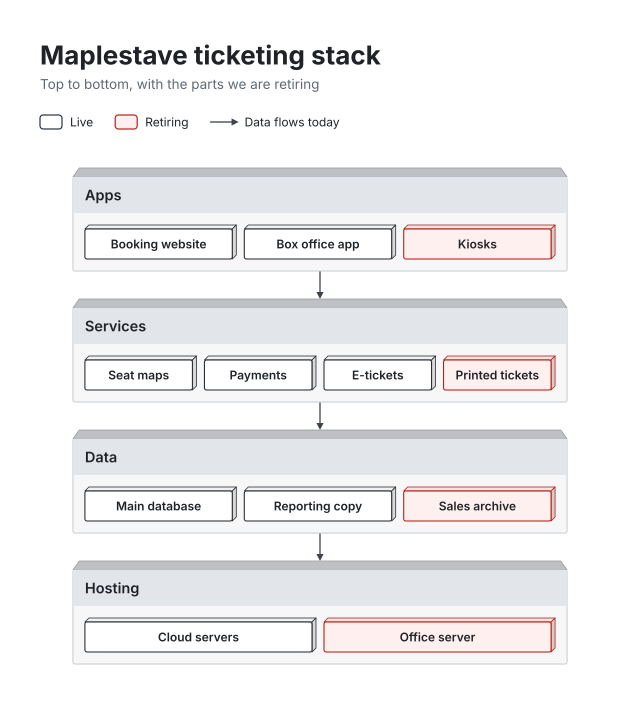
The check: 0 layout problems
What changed between drafts?
The agent removed the three arrows. The stacking already shows the order, and the agent skill's rule for lines is "Only the flows that matter." The key now shows only "Live" and "Retiring".
What was the result?
Two rounds: two drafts, two runs of the check, 0 layout problems each time, in a picture 640 by 704 pixels.
{
  "title": "Maplestave ticketing stack",
  "subtitle": "Top to bottom, with the parts we are retiring",
  "columns": [[
    {"id": "apps", "title": "Apps", "cols": 3,
     "tiles": ["Booking website", "Box office app", {"label": "Kiosks", "status": "retiring"}]},
    {"id": "services", "title": "Services", "cols": 4,
     "tiles": ["Seat maps", "Payments", "E-tickets", {"label": "Printed tickets", "status": "retiring"}]},
    {"id": "data", "title": "Data", "cols": 3,
     "tiles": ["Main database", "Reporting copy", {"label": "Sales archive", "status": "retiring"}]},
    {"id": "hosting", "title": "Hosting", "cols": 2,
     "tiles": ["Cloud servers", {"label": "Office server", "status": "retiring"}]}
  ]]
}
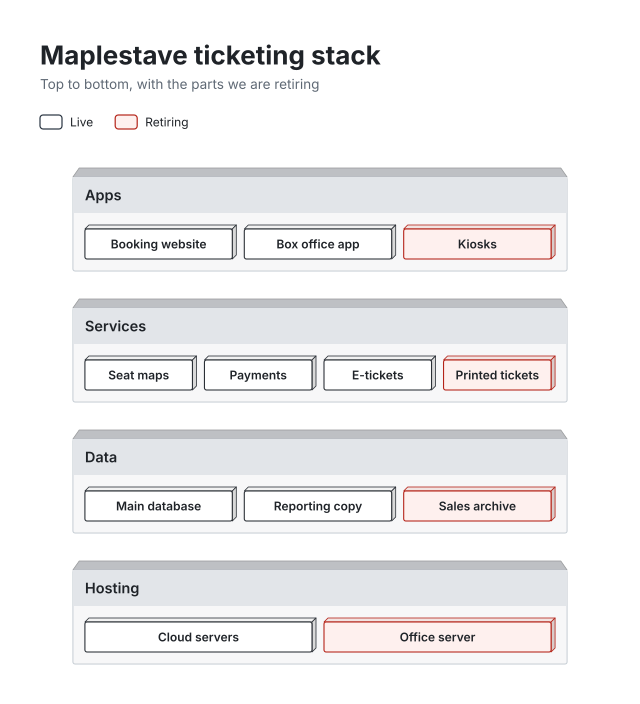
The check: 0 layout problems
Drawn by Claude Opus 5.5 on November 25, 2026, with open-diagram 0.6.2's check command, the same check the MCP server's check tool runs.