Draw architecture diagrams with Claude Code and an MCP server
This guide is for people who want Claude Code to draw their architecture diagrams. After two installs, Claude writes a diagram, checks it and fixes every layout problem before it draws. Claude Desktop, Cursor and Amp have their own setup guide.
Updated
How do I add the MCP server?
Run one command in a terminal. The MCP server is a small program that Claude Code starts on your computer, so Claude can check and draw diagrams with tools of its own.
claude mcp add open-diagram -- uvx open-diagram mcpThe command uses uv, which fetches open-diagram and the Python it needs (3.10 or later) the first time. Without uv, run pip install open-diagram, then give open-diagram as the command and mcp as its first argument.
uv keeps a copy of what it downloaded. To pick up a new release, add --refresh once after uvx. Setups made before 0.6.2 with --from "open-diagram[mcp]" open-diagram-mcp keep working.
What can the server read and write?
It takes JSON and Mermaid only, never Python, and writes files only inside the folder that --out names. Nothing is hosted, and nothing leaves your computer.
The command above has no --out, so files go to the folder in the OPEN_DIAGRAM_OUT environment variable, else to an open-diagram folder where Claude Code starts the server. If that folder cannot be written, they go to one in your home folder.
Icons come only from the built-in icons and from folders you name with --icons or the OPEN_DIAGRAM_ICONS environment variable. The server never reads an icon from a path Claude writes.
How do I add the agent skill?
The agent skill is a file of instructions that Claude loads when you ask for a diagram. To install it, run this in your project folder:
npx skills add lukendeasy/open-diagram --skill open-diagram --agent claude-codeThe skills tool puts it in .claude/skills/ in that folder. Add -g to install it for all your projects. In a copy of the open-diagram repository, you can copy the folder instead:
cp -r skills/open-diagram ~/.claude/skills/The skill tells Claude to plan the picture and to use only facts you gave. If the picture needs a fact you left out, Claude asks. If you want owner lines but named no owner, it writes "Owner: Not yet named". Without the MCP server, the skill has Claude install open-diagram if needed, write a file and run open-diagram check on it.
What does Claude do when I ask for a diagram?
Claude reads the format guide once, then writes and checks the diagram until the check reports 0 layout problems. Only then does it draw.
{
  "title": "How an agent draws with the open-diagram MCP server",
  "legend": false,
  "gap": 110,
  "columns": [
    [{"id": "guide", "title": "Read the format", "tiles": ["format_guide"], "cols": 1}],
    [{"id": "write", "title": "Write the diagram", "tiles": ["JSON or Mermaid"], "cols": 1}],
    [{"id": "check", "title": "Check the layout", "tiles": ["check"], "cols": 1}],
    [{"id": "draw", "title": "Draw and compare", "tiles": ["draw", "describe"], "cols": 1}]
  ],
  "links": [
    {"from": "guide", "to": "write", "label": "once"},
    {"from": "write", "to": "check"},
    {"from": "check", "to": "write", "lane": "bottom", "label": "fix each named problem"},
    {"from": "check", "to": "draw", "label": "0 problems"}
  ]
}
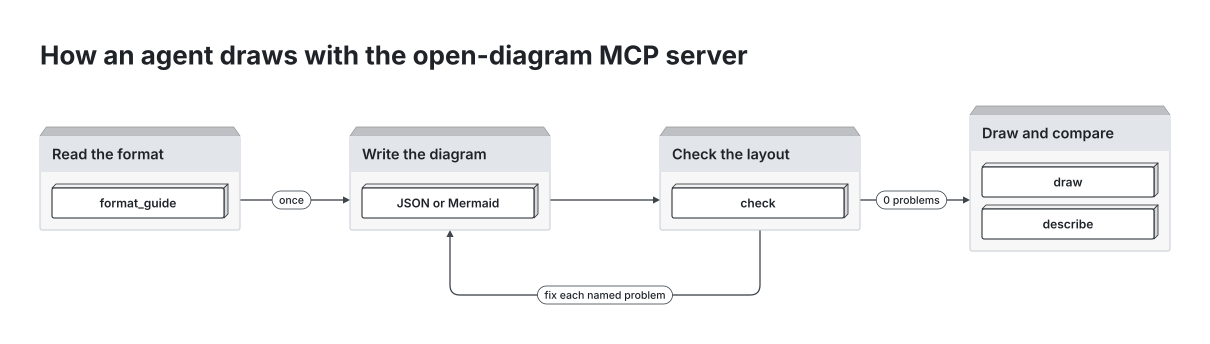
The check: 0 layout problems
The MCP server gives Claude five tools:
| Tool | What Claude gets |
|---|---|
format_guide | A JSON example to copy, every key, Mermaid support, and how to fix each kind of problem |
template | The list of templates, or one template as JSON to start from |
check | The layout problems, without writing files |
draw | The SVG and PNG written, plus the problems, the file paths, the description and the picture |
describe | What the picture says, in plain words |
Each problem comes back as a sentence that names the parts, such as the label 'pickup orders' on line 'orders' -> 'lockers' sits on 'orders'. For a cloud picture, Claude calls template first and starts from the closest template.
After draw, Claude compares the description with your request. Every system, state, owner and line you named should be there, and nothing you did not name. Claude then tells you where the SVG and PNG are, and which facts in the picture are its own assumptions.
What should I ask for?
Ask in plain words, with the systems, owners and states you know. The docs give this example: "Draw a systems map of our checkout, warehouse and reporting, with what is live and what is planned."
Has this been tested?
Yes, on November 25, 2026, with open-diagram 0.6.2 on macOS. In Claude Code 2.1.332, Claude called format_guide, check and draw, and the SVG and PNG were written with 0 layout problems. The same day, skills 1.9.0 installed the agent skill, and Claude Code loaded it from the folder the tool wrote.