Draw diagrams without Python: write JSON from any language
This guide is for developers whose code is in JavaScript, C# or another language that is not Python. Your program writes a JSON file, and one command turns it into a checked SVG and PNG.
Updated
Do I need Python?
Only to run the open-diagram command, which needs Python 3.10 or later. Your own program can be in any language that can write a text file. The command reads the JSON, then measures, lays out and checks the diagram.
What does the JSON look like?
A title, one layout, and the lines between panels. Here the layout is columns, a list of columns, each a list of panels:
{
  "title": "How a bus ticket is booked",
  "columns": [
    [{"id": "web", "title": "Booking site", "tiles": ["Search", "Pay"], "cols": 1}],
    [{"id": "api", "title": "Booking API", "tiles": ["Seats", "Prices"], "cols": 1}],
    [{"id": "db", "title": "Bookings database", "tiles": ["Trips", "Tickets"], "cols": 1}]
  ],
  "links": [
    {"from": "web", "to": "api"},
    {"from": "api", "to": "db"}
  ]
}
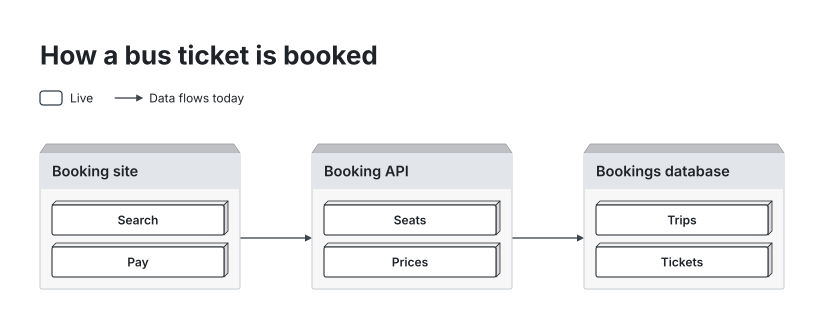
The check: 0 layout problems
A tile is a string, or an object with label, sub, status and icon. A link joins two panel ids, and can take a label, a kind (flow or planned) and a lane (top or bottom). The JSON reference lists every key.
How do I write it from my own code?
Build the object from your data and save it as a file. This JavaScript example, for Node.js, writes the diagram above from a list of services:
// Example: write-diagram.js builds the diagram from a list of services and saves it as JSON.
const fs = require("fs");

const services = [
  { id: "web", title: "Booking site", tiles: ["Search", "Pay"] },
  { id: "api", title: "Booking API", tiles: ["Seats", "Prices"] },
  { id: "db", title: "Bookings database", tiles: ["Trips", "Tickets"] },
];

const diagram = {
  title: "How a bus ticket is booked",
  columns: services.map((s) => [{ ...s, cols: 1 }]),
  links: services.slice(1).map((s, i) => ({ from: services[i].id, to: s.id })),
};

fs.writeFileSync("booking.json", JSON.stringify(diagram, null, 2));
Then run the program and draw the file:
$ node write-diagram.js
$ open-diagram draw booking.json
wrote booking.svg, booking.png: 824 x 329 px; smallest text 12 px; 0 layout problem(s)
A C# program, or any other, that writes the same JSON gets the same picture. An AI agent connected to the MCP server sends the same JSON as text, with no file to write.
How do I know the JSON is right?
Run open-diagram check. It builds the diagram in memory, writes nothing, and names the place of any mistake:
$ open-diagram check booking-bad.json
error: columns[0][0].tiles[2]: unknown key(s) 'colour'; allowed: icon, label, status, sub
Each layout problem comes back as a sentence that names the parts involved. check and draw exit with 1 when the layout has problems, and with 2 when the file has a mistake like the one above or cannot be opened. A build script can stop on either.
Can I start from an example?
Yes, from a template. open-diagram new lists the templates, and open-diagram new azure_web_app writes one as JSON to edit. Every template is a JSON file, so it works from any language that can read and write JSON.