AWS, Azure and Google Cloud icons in architecture diagrams
This guide is for people who draw cloud architecture and want each service shown with its provider's icon. open-diagram comes with 20 icons, and the cloud-icons skill tells an agent how to fetch more.
Updated
How do I start a cloud diagram?
Start from one of the four cloud templates. open-diagram new lists them:
$ open-diagram new
aws_etl             Data ingestion on AWS in six numbered sections, from orchestration to dashboards
aws_architecture    An AWS account, network and subnets around an API, a function, a database and storage
azure_web_app       A web app on Azure behind Front Door, with its database and cache inside a virtual network
gcp_event_pipeline An event pipeline on Google Cloud from Pub/Sub to a warehouse and a forecast model- Run
open-diagram new azure_web_appto writeazure_web_app.jsonin the current folder. - Change each resource's
labelto your own words. - Keep each
sub, the service name under the icon. - If a resource needs to move, change its
xandy. - After each change, run
open-diagram check azure_web_app.json. - Run
open-diagram draw azure_web_app.json.
The template's icons come with the package, so drawing it never uses the network. Over the MCP server, an agent gets the same JSON from the template tool.
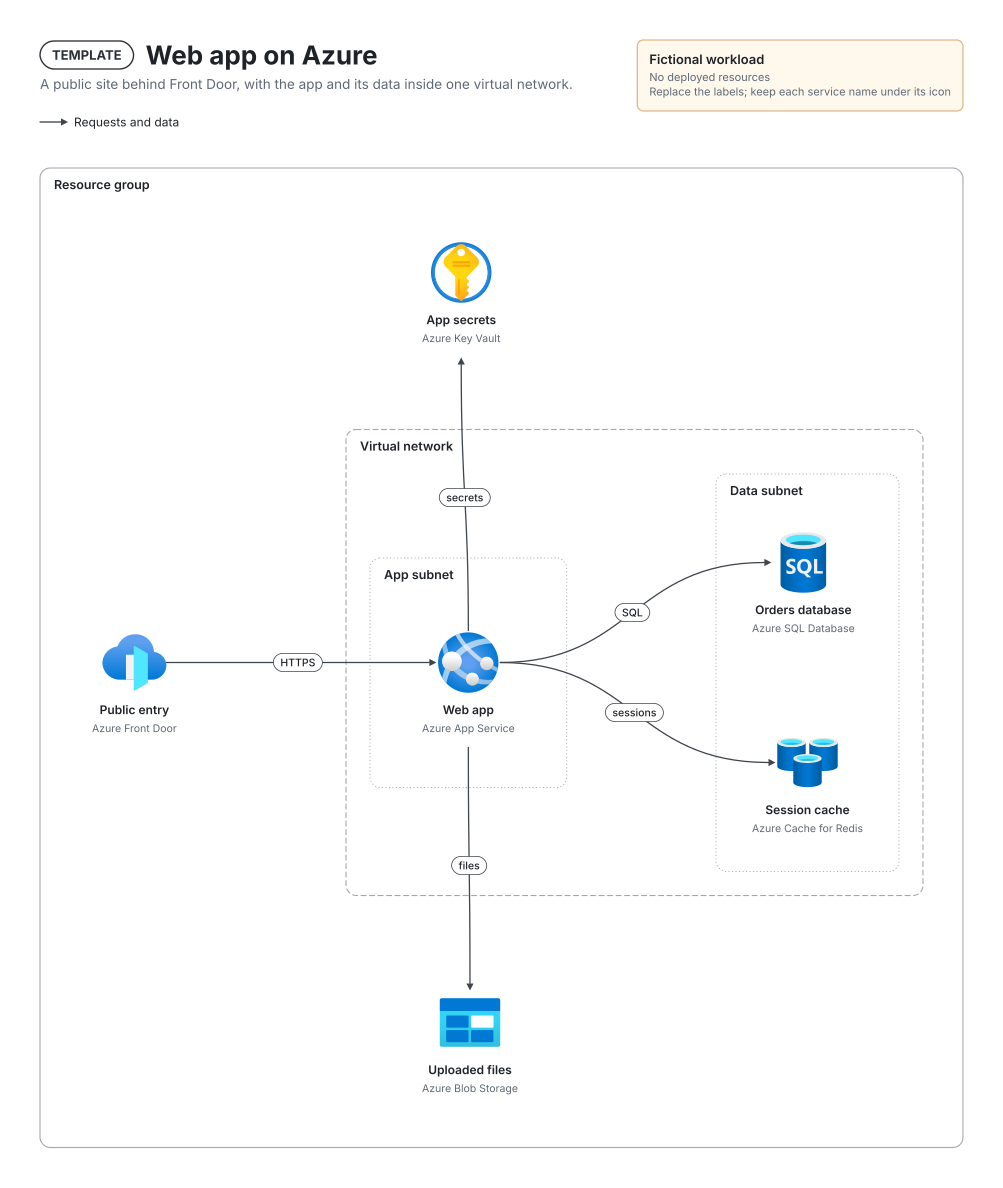
Web app on Azure. Drawn by open-diagram 0.6.2 from templates/azure_web_app.json: 0 layout problems. Open in the editor · Source
The picture as text
Web app on Azure
A public site behind Front Door, with the app and its data inside one virtual network.
Solid lines: requests and data.

Blocks, left to right:
- Public entry (Azure Front Door)
- App secrets (Azure Key Vault)
- Web app (Azure App Service)
- Uploaded files (Azure Blob Storage)
- Orders database (Azure SQL Database)
- Session cache (Azure Cache for Redis)
Groups:
- App subnet: Web app
- Data subnet: Orders database, Session cache
- Virtual network: Web app, Orders database, Session cache
- Resource group: Public entry, Web app, Orders database, Session cache, App secrets, Uploaded files
Lines:
- Public entry -> Web app, labeled "HTTPS"
- Web app -> Orders database, labeled "SQL"
- Web app -> Session cache, labeled "sessions"
- Web app -> App secrets, labeled "secrets"
- Web app -> Uploaded files, labeled "files"
Note: Fictional workload. No deployed resources Replace the labels; keep each service name under its icon
Which icons come with open-diagram?
Twenty, all used by the templates:
| Provider | Icon names |
|---|---|
| AWS | aws/api-gateway, aws/athena, aws/glue, aws/lambda, aws/mwaa, aws/quicksight, aws/rds, aws/s3 |
| Azure | azure/app-service, azure/block-blob, azure/cache-for-redis, azure/front-door, azure/key-vault, azure/sql-database |
| Google Cloud | gcp/bigquery, gcp/cloud-functions, gcp/cloud-run, gcp/cloud-storage, gcp/pub-sub, gcp/vertex-ai |
In JSON, a resource or a tile takes an icon by name. A resource is a large icon with its label and service name under it. An enclosure is a box around resources.
{
  "title": "Photo uploads on Google Cloud",
  "subtitle": "An invented workload",
  "resources": [
    {"id": "run", "label": "Upload service", "sub": "Cloud Run", "icon": "gcp/cloud-run", "x": 0, "y": 0},
    {"id": "bucket", "label": "Original photos", "sub": "Cloud Storage", "icon": "gcp/cloud-storage", "x": 300, "y": 0},
    {"id": "topic", "label": "New photo events", "sub": "Pub/Sub", "icon": "gcp/pub-sub", "x": 600, "y": 0}
  ],
  "enclosures": [
    {"id": "project", "label": "Cloud project", "members": ["run", "bucket", "topic"], "border": "dashed"}
  ],
  "links": [
    {"from": "run", "to": "bucket", "label": "writes"},
    {"from": "bucket", "to": "topic", "label": "notifies"}
  ]
}
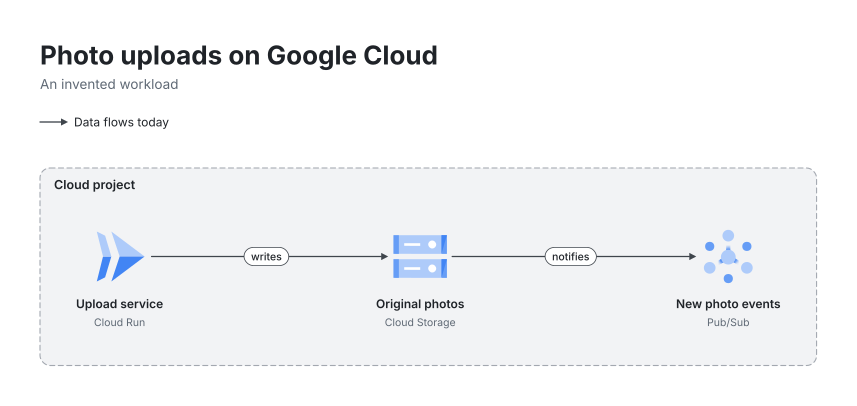
The check: 0 layout problems
open-diagram looks for an icon name next to the JSON file, then in each folder given with --icons FOLDER, then among the built-in icons. Full paths and .. are refused: icon '/etc/passwd' must be a name inside an icon folder, such as 'aws/s3'; full paths and '..' are not allowed. Mermaid input takes no icons.
What if my service has no built-in icon?
Use the cloud-icons skill. The open-diagram repository's cloud-icons/ folder has one list per provider: 33 AWS services, 30 Azure and 30 Google Cloud. Each entry is a service key, such as s3 or lambda, with the web address of its SVG icon. Every address points to one fixed version of the file, hosted by a third party, theSVG.
The skill tells an agent how to pick icons, download them, and pass each file to Resource(icon=...) or Tile(icon=...) in Python. For Claude Code, copy it into your skills folder from a copy of the repository:
cp -r skills/cloud-icons ~/.claude/skills/The icon lists stay in your copy of the repository, so if you run the skill's example from another folder, set its ICON_DIR to that copy's cloud-icons/ folder. Once downloaded, the icons work offline. The finished SVG and PNG contain the icons themselves, so you can share them without the icon links.
What terms do the icons carry?
Their owners' terms. The icons belong to Amazon, Microsoft and Google, and open-diagram's MIT license does not cover them.
| Provider | What the library's notes say |
|---|---|
| AWS | The icon catalog lists them as CC BY-ND 2.0. Credit Amazon Web Services and link to the AWS source and license when you share a diagram. The QuickSight icon comes from an AWS Labs release, with its license in templates/assets/aws/LICENSE-QuickSight.txt |
| Azure | Microsoft's icon terms permit the icons in architecture diagrams. They ask that icons are not cropped, flipped, rotated or reshaped, and that the product name appears next to each icon. The catalog lists them as MIT |
| Google Cloud | Google owns the artwork; the source is Google Cloud icons. The catalog lists them as Apache-2.0. Follow Google's guidance |
When you share the pictures or the icon files, keep these credits, source links and license notices with them.