AWS architecture diagram with VPC and subnets, from JSON
Anyone who draws systems on AWS can start from this 24-line JSON template, which uses AWS's own icons.
Updated
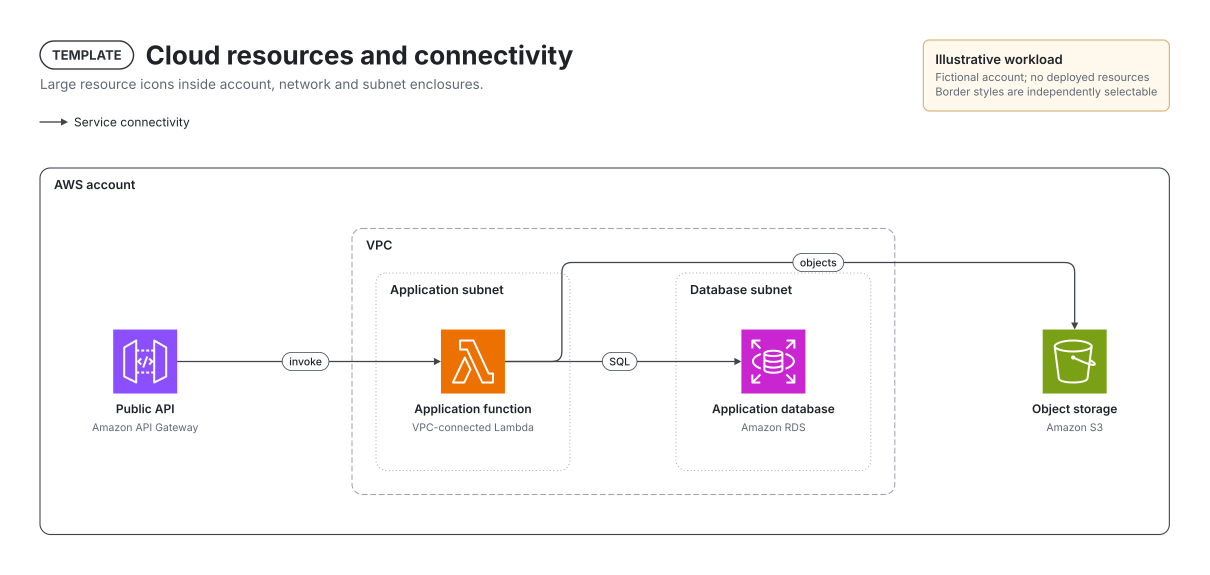
Cloud resources and connectivity. Drawn by open-diagram 0.6.2 from templates/aws_architecture.json: 0 layout problems. Open in the editor · Source
The picture as text
Cloud resources and connectivity
Large resource icons inside account, network and subnet enclosures.
Solid lines: service connectivity.

Blocks, left to right:
- Public API (Amazon API Gateway)
- Application function (VPC-connected Lambda)
- Application database (Amazon RDS)
- Object storage (Amazon S3)
Groups:
- Application subnet: Application function
- Database subnet: Application database
- VPC: Application function, Application database
- AWS account: Public API, Application function, Application database, Object storage
Lines:
- Public API -> Application function, labeled "invoke"
- Application function -> Application database, labeled "SQL"
- Application function -> Object storage, labeled "objects"
Note: Illustrative workload. Fictional account; no deployed resources Border styles are independently selectable
What does this AWS diagram show?
A public API on Amazon API Gateway invokes a function on Lambda, which sends SQL to an RDS database and objects to S3. The function and the database each have a subnet, a section of the network. Both subnets sit inside the VPC, the account's private network.
What is the template made of?
{
  "title": "Cloud resources and connectivity",
  "tag": "TEMPLATE",
  "subtitle": "Large resource icons inside account, network and subnet enclosures.",
  "note": {"title": "Illustrative workload", "lines": ["Fictional account; no deployed resources", "Border styles are independently selectable"]},
  "theme": {"link_labels": {"flow": "Service connectivity"}},
  "resources": [
    {"id": "gateway", "label": "Public API", "sub": "Amazon API Gateway", "icon": "aws/api-gateway", "x": 0, "y": 240},
    {"id": "function", "label": "Application function", "sub": "VPC-connected Lambda", "icon": "aws/lambda", "x": 320, "y": 240},
    {"id": "database", "label": "Application database", "sub": "Amazon RDS", "icon": "aws/rds", "x": 620, "y": 240},
    {"id": "objects", "label": "Object storage", "sub": "Amazon S3", "icon": "aws/s3", "x": 940, "y": 240}
  ],
  "enclosures": [
    {"id": "app", "label": "Application subnet", "members": ["function"], "border": "dotted", "fill": "#FFFFFF"},
    {"id": "data", "label": "Database subnet", "members": ["database"], "border": "dotted", "fill": "#FFFFFF"},
    {"id": "vpc", "label": "VPC", "members": ["app", "data"], "pad": 24, "border": "dashed", "fill": "#FFFFFF"},
    {"id": "account", "label": "AWS account", "members": ["gateway", "vpc", "objects"], "border": "solid", "pad": 40, "fill": "#FFFFFF", "stroke": "#3F454C"}
  ],
  "links": [
    {"from": "gateway", "to": "function", "label": "invoke"},
    {"from": "function", "to": "database", "label": "SQL"},
    {"from": "function", "to": "objects", "label": "objects", "start": "right", "end": "top", "via_y": 185}
  ]
}resourcesare the services. Each has alabelin your words, asubnaming the AWS service, aniconsuch asaws/s3, and anxandyin pixels.enclosuresare the boxes around them, listed from the inside out: the two subnets, the VPC, then the account.- Each enclosure sets its own
border: dotted for the subnets, dashed for the VPC, solid for the account. Border style does not show whether a part is live or planned. theme.link_labelsnames the one kind of line in the key.via_ysets the height at which theobjectsline passes over the database subnet.
How do I start from this template?
- Install open-diagram:
pip install open-diagram. - Run
open-diagram new aws_architecture. It writesaws_architecture.jsonin the current folder. - Change each
labelto your own words, and keep eachsub. - To move a resource, change its
xandy. - Run
open-diagram check aws_architecture.json. It names every overlap, crossing line and cramped label. - Run
open-diagram draw aws_architecture.json. The icons come with the package, so drawing works offline.
An AI agent connected to the MCP server gets the same JSON from the template tool.
Where do the icons come from, and may I use them?
They are Amazon Web Services' architecture icons, unchanged, from one fixed version of theSVG catalog, which lists them as CC BY-ND 2.0. Amazon owns the artwork and its trademarks, and AWS's guidance is at aws.amazon.com/architecture/icons. open-diagram's MIT license does not cover the icons. Keep their credits, source links and license notices when you share the pictures.
For a service with no built-in icon, the cloud icons guide shows how to download one.