Card payment flow diagram, drawn from Python
If you explain card payments, this example follows one simplified in-store payment, from tap to approval and settlement, in a 34-line Python script.
Updated
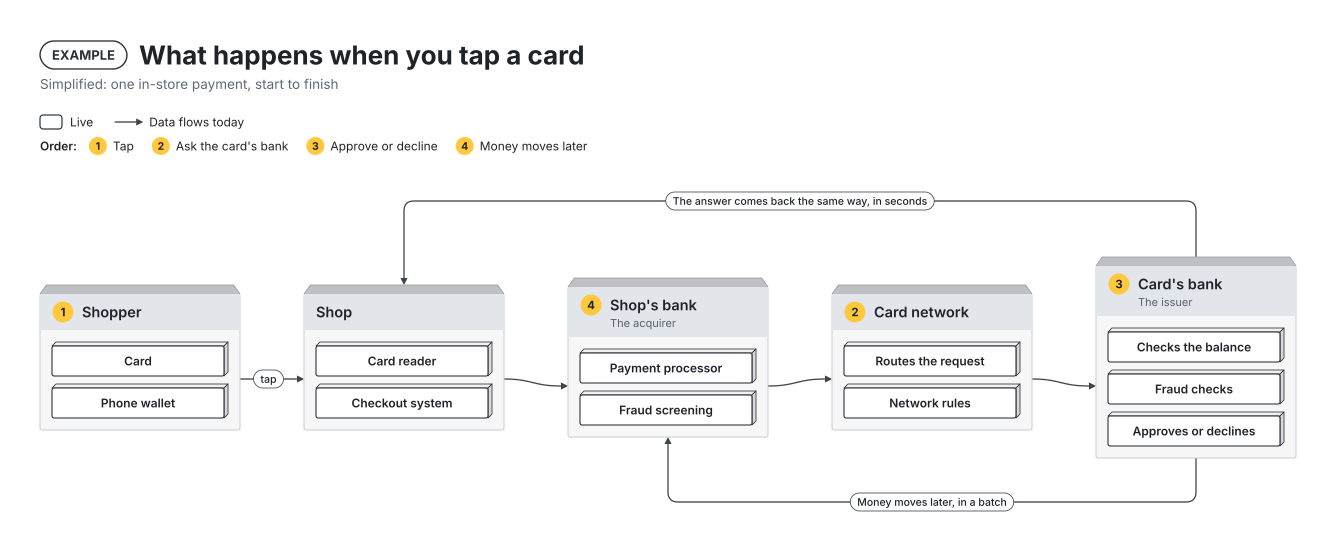
What happens when you tap a card. Drawn by open-diagram 0.6.2 from examples/card_payment.py: 0 layout problems. Source
The picture as text
What happens when you tap a card
Simplified: one in-store payment, start to finish
States shown: Live. Solid lines: data flows today.
Order: 1. Tap (Shopper); 2. Ask the card's bank (Card network); 3. Approve or decline (Card's bank); 4. Money moves later (Shop's bank).

Blocks, left to right:
- Shopper [step 1]: Card; Phone wallet
- Shop: Card reader; Checkout system
- Shop's bank [step 4] (The acquirer): Payment processor; Fraud screening
- Card network [step 2]: Routes the request; Network rules
- Card's bank [step 3] (The issuer): Checks the balance; Fraud checks; Approves or declines
Lines:
- Shopper -> Shop, labeled "tap"
- Shop -> Shop's bank
- Shop's bank -> Card network
- Card network -> Card's bank
- Card's bank -> Shop, labeled "The answer comes back the same way, in seconds"
- Card's bank -> Shop's bank, labeled "Money moves later, in a batch"
Who asks whom, and when does the money move?
Five parties sit in a row. The request travels left to right, the answer comes back along the top in seconds, and the money moves later, in a batch, along the bottom.
Numbered steps give the order of events, which differs from the order on the page. The two banks have subtitles in the payment industry's terms: "The acquirer" and "The issuer".
Which building blocks draw it?
"""What happens when you tap a card in a shop, simplified. Run: python3 examples/card_payment.py"""
import os

from open_diagram import Diagram, Panel, Tiles

HERE = os.path.dirname(os.path.abspath(__file__))

STEPS = [(1, "Tap"), (2, "Ask the card's bank"), (3, "Approve or decline"), (4, "Money moves later")]


def build() -> Diagram:
    d = Diagram("What happens when you tap a card", subtitle="Simplified: one in-store payment, start to finish",
                tag="EXAMPLE", steps=STEPS, steps_label="Order")
    (shopper,), (shop,), (acquirer,), (network,), (issuer,) = d.columns([
        [Panel("Shopper", Tiles(["Card", "Phone wallet"], cols=1), step=1)],
        [Panel("Shop", Tiles(["Card reader", "Checkout system"], cols=1))],
        [Panel("Shop's bank", Tiles(["Payment processor", "Fraud screening"], cols=1), sub="The acquirer", step=4)],
        [Panel("Card network", Tiles(["Routes the request", "Network rules"], cols=1), step=2)],
        [Panel("Card's bank", Tiles(["Checks the balance", "Fraud checks", "Approves or declines"], cols=1),
               sub="The issuer", step=3)],
    ], gap=64, valign="center")
    d.link(shopper, shop, label="tap")
    d.link(shop, acquirer)
    d.link(acquirer, network)
    d.link(network, issuer)
    top = min(p.y for p in d.placed) - 56
    bottom = max(p.bottom for p in d.placed) + 44
    d.link(issuer, shop, start="top", end="top", via_y=top, label="The answer comes back the same way, in seconds")
    d.link(issuer, acquirer, start="bottom", end="bottom", via_y=bottom, label="Money moves later, in a batch")
    return d


if __name__ == "__main__":
build().save(os.path.join(HERE, "..", "docs", "images", "card_payment"))d.columns()places the five panels, 64 px apart, centred against the tallest.step=on four panels, withsteps=andsteps_label="Order"on theDiagram, draws the numbered key.sub="The acquirer"adds a subtitle under a panel title.- The two return lines use
via_y. The script reads where the panels landed fromd.placed, then sets one lane 56 px above the highest panel and one 44 px below the lowest.
Why do the return lines go around the panels?
A line drawn straight back from the card's bank to the shop would pass through the panels between them. The check names each crossing, as in this shorter script:
from open_diagram import Diagram, Panel, Tiles


def build():
    d = Diagram("What happens when you tap a card")
    (shop,), (acquirer,), (network,), (issuer,) = d.columns([
        [Panel("Shop", Tiles(["Card reader", "Checkout system"], cols=1))],
        [Panel("Shop's bank", Tiles(["Payment processor", "Fraud screening"], cols=1))],
        [Panel("Card network", Tiles(["Routes the request", "Network rules"], cols=1))],
        [Panel("Card's bank", Tiles(["Checks the balance", "Approves or declines"], cols=1))],
    ], gap=64)
    d.link(shop, acquirer)
    d.link(acquirer, network)
    d.link(network, issuer)
    d.link(issuer, shop, start="left", end="right", label="The answer comes back")
    return d
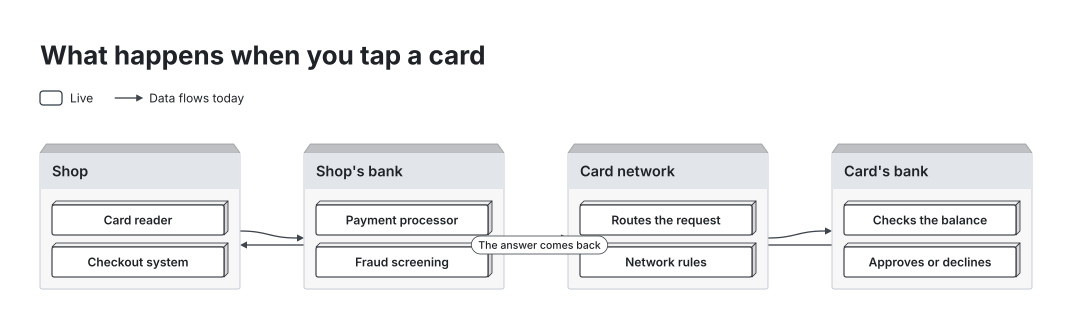
The check: 4 layout problem(s)
line 'Card's bank' -> 'Shop' crosses 'Shop's bank'; route it with via_x/via_y, move a block, or pass cross_ok=Trueline 'Card's bank' -> 'Shop' crosses 'Card network'; route it with via_x/via_y, move a block, or pass cross_ok=Truethe label 'The answer comes back' on line 'Card's bank' -> 'Shop' sits on 'Shop's bank'the label 'The answer comes back' on line 'Card's bank' -> 'Shop' sits on 'Card network'Each message names the line, the panel in its way and the fixes to try. The example takes the first: start="top", end="top" and a via_y above every panel.
How do I make my own?
Install open-diagram with pip install open-diagram, copy examples/card_payment.py, and change the parties, tiles and steps to your own flow. Run open-diagram check card_payment.py and fix each crossing it names, then open-diagram draw card_payment.py to write the SVG and PNG.
When is this kind of flow useful?
For any request that goes out through several parties and comes back, such as a payment or a bounced email.