Azure web app architecture diagram template, as JSON
If you draw web apps on Microsoft Azure, start from this 28-line JSON template with Azure's own icons.
Updated
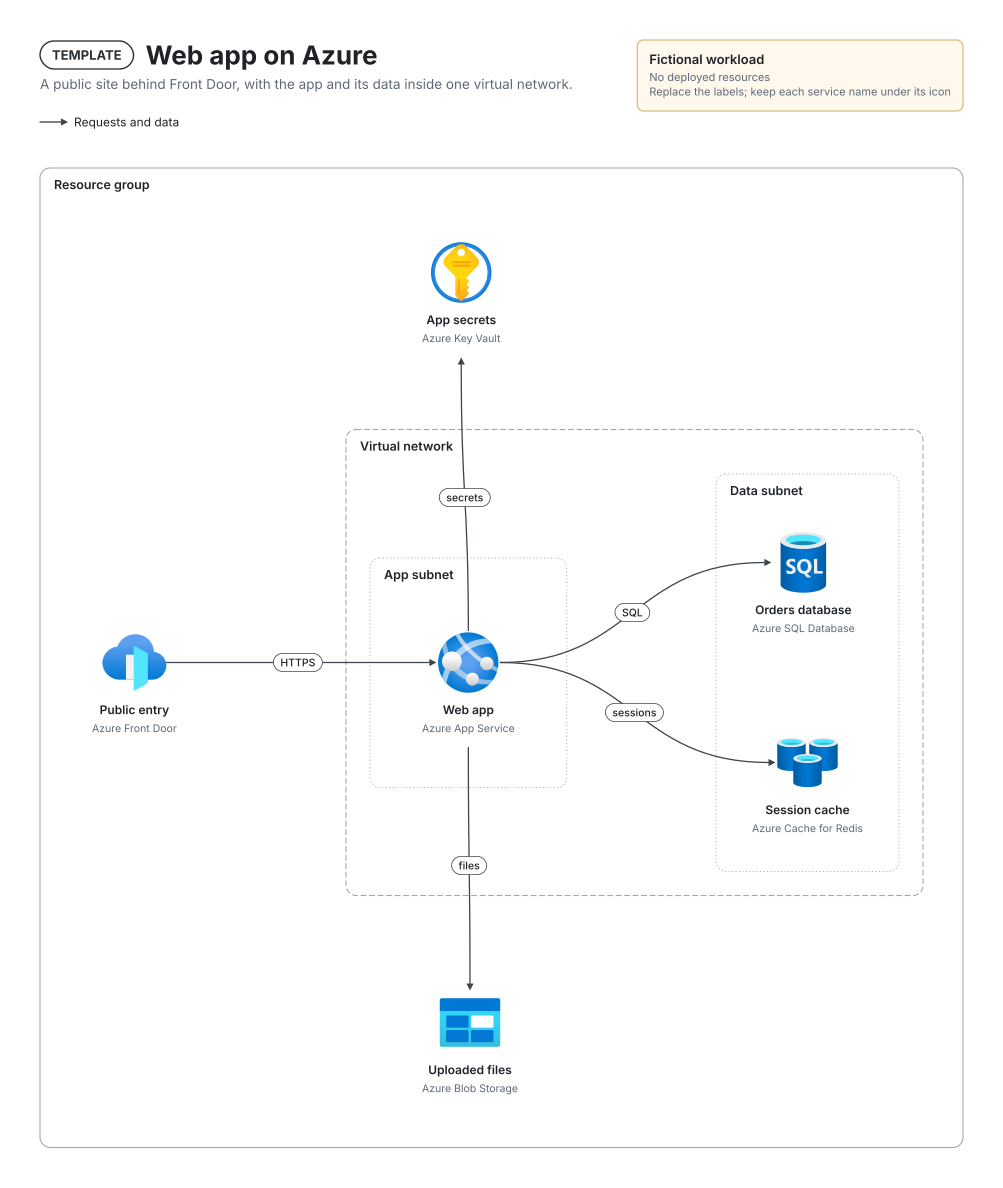
Web app on Azure. Drawn by open-diagram 0.6.2 from templates/azure_web_app.json: 0 layout problems. Open in the editor · Source
The picture as text
Web app on Azure
A public site behind Front Door, with the app and its data inside one virtual network.
Solid lines: requests and data.

Blocks, left to right:
- Public entry (Azure Front Door)
- App secrets (Azure Key Vault)
- Web app (Azure App Service)
- Uploaded files (Azure Blob Storage)
- Orders database (Azure SQL Database)
- Session cache (Azure Cache for Redis)
Groups:
- App subnet: Web app
- Data subnet: Orders database, Session cache
- Virtual network: Web app, Orders database, Session cache
- Resource group: Public entry, Web app, Orders database, Session cache, App secrets, Uploaded files
Lines:
- Public entry -> Web app, labeled "HTTPS"
- Web app -> Orders database, labeled "SQL"
- Web app -> Session cache, labeled "sessions"
- Web app -> App secrets, labeled "secrets"
- Web app -> Uploaded files, labeled "files"
Note: Fictional workload. No deployed resources Replace the labels; keep each service name under its icon
What does this Azure diagram show?
Requests enter through Azure Front Door and reach the web app on App Service over HTTPS. The web app keeps orders in an Azure SQL database and sessions in Azure Cache for Redis. It gets its secrets from Key Vault, above it, and keeps uploaded files in Blob Storage, below it.
The web app has its own subnet, a section of the network, and the database and cache share another. Both subnets sit inside the virtual network, and everything sits inside one resource group, Azure's container for the parts of one system.
What is the template made of?
{
  "title": "Web app on Azure",
  "tag": "TEMPLATE",
  "subtitle": "A public site behind Front Door, with the app and its data inside one virtual network.",
  "note": {"title": "Fictional workload", "lines": ["No deployed resources", "Replace the labels; keep each service name under its icon"]},
  "theme": {"link_labels": {"flow": "Requests and data"}},
  "resources": [
    {"id": "edge", "label": "Public entry", "sub": "Azure Front Door", "icon": "azure/front-door", "x": 0, "y": 300},
    {"id": "web", "label": "Web app", "sub": "Azure App Service", "icon": "azure/app-service", "x": 330, "y": 300},
    {"id": "db", "label": "Orders database", "sub": "Azure SQL Database", "icon": "azure/sql-database", "x": 660, "y": 200},
    {"id": "cache", "label": "Session cache", "sub": "Azure Cache for Redis", "icon": "azure/cache-for-redis", "x": 660, "y": 400},
    {"id": "secrets", "label": "App secrets", "sub": "Azure Key Vault", "icon": "azure/key-vault", "x": 330, "y": -90},
    {"id": "files", "label": "Uploaded files", "sub": "Azure Blob Storage", "icon": "azure/block-blob", "x": 330, "y": 660}
  ],
  "enclosures": [
    {"id": "app", "label": "App subnet", "members": ["web"], "border": "dotted", "fill": "#FFFFFF", "pad": 40},
    {"id": "data", "label": "Data subnet", "members": ["db", "cache"], "border": "dotted", "fill": "#FFFFFF"},
    {"id": "vnet", "label": "Virtual network", "members": ["app", "data"], "border": "dashed", "fill": "#FFFFFF"},
    {"id": "group", "label": "Resource group", "members": ["edge", "vnet", "secrets", "files"], "border": "solid", "pad": 40, "fill": "#FFFFFF"}
  ],
  "links": [
    {"from": "edge", "to": "web", "label": "HTTPS"},
    {"from": "web", "to": "db", "label": "SQL"},
    {"from": "web", "to": "cache", "label": "sessions"},
    {"from": "web", "to": "secrets", "label": "secrets", "start": "top", "end": "bottom"},
    {"from": "web", "to": "files", "label": "files", "start": "bottom", "end": "top"}
  ]
}- Six
resources, each with alabelin your words, asubnaming the Azure service, anicon, and anxandyin pixels. - Four
enclosures, listed from the inside out: the two subnets, the virtual network around both, then the resource group. - Five
links. The lines to Key Vault and Blob Storage setstartandend, so they leave the top and bottom of the web app.
How do I start from this template?
After pip install open-diagram, run open-diagram new azure_web_app to write azure_web_app.json in the current folder. Change the labels and keep each sub, then run open-diagram check azure_web_app.json and open-diagram draw azure_web_app.json. The templates reference covers moving resources and the other steps. An AI agent connected to the MCP server gets the same JSON from the template tool.
Where do the icons come from, and may I use them?
They are Microsoft's Azure architecture icons, unchanged, from one fixed version of theSVG catalog, which lists their license as MIT. Microsoft owns the artwork, and open-diagram's MIT license does not cover it. Microsoft's terms allow the icons in architecture diagrams. They ask that the icons are not cropped, flipped, rotated or reshaped, and that the product name appears next to each one, which is what each sub does. Keep the credits and source links when you share the pictures.