Sign-up flow diagram drawn from a Mermaid flowchart
If you already write flowcharts in Mermaid, a text format for diagrams, this page shows what open-diagram does with one. The example is a 20-line sign-up flow, drawn with open-diagram draw signup_flow.mmd and checked like any other diagram.
Updated
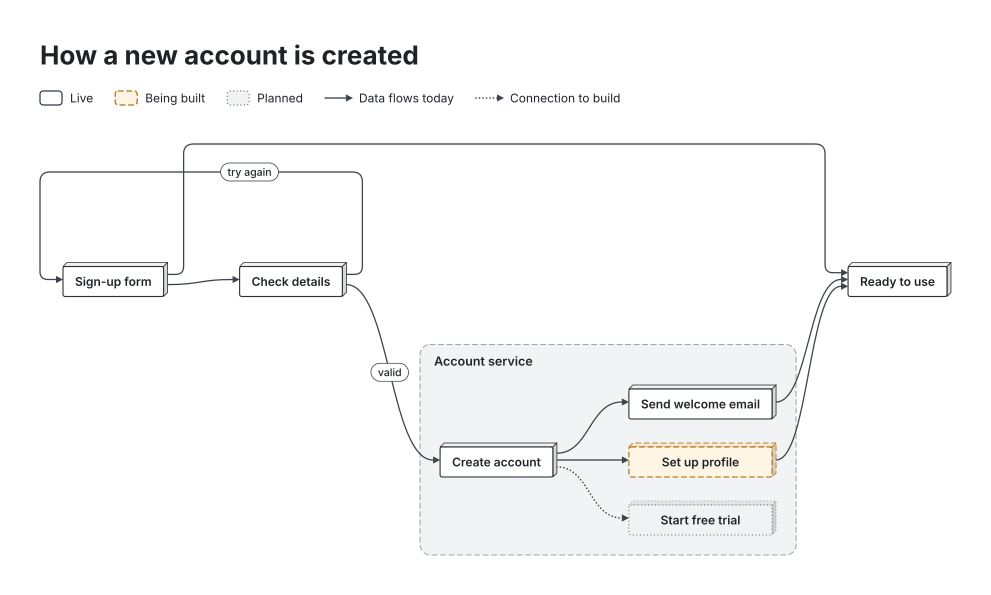
How a new account is created. Drawn by open-diagram 0.6.2 from examples/signup_flow.mmd: 0 layout problems. Open in the editor · Source
The picture as text
How a new account is created
States shown: Live, Being built, Planned. Solid lines: data flows today. Dotted lines: connection to build.

Blocks, left to right:
- Sign-up form
- Check details
- Create account
- Send welcome email
- Set up profile (being built)
- Start free trial (planned)
- Ready to use
Groups:
- Account service: Create account, Send welcome email, Set up profile, Start free trial
Lines:
- Sign-up form -> Check details
- Check details -> Create account, labeled "valid"
- Check details -> Sign-up form, labeled "try again"
- Create account -> Send welcome email
- Create account -> Set up profile
- Create account -> Start free trial (connection to build)
- Send welcome email -> Ready to use
- Set up profile -> Ready to use
- Sign-up form -> Ready to use
What does open-diagram read from the file?
---
title: How a new account is created
---
%% Drawn from Mermaid: open-diagram draw examples/signup_flow.mmd
flowchart LR
  form[Sign-up form] --> check{Check details}
  check -->|valid| create[Create account]
  check -->|try again| form
  create --> email[Send welcome email]
  create --> profile[Set up profile]:::building
  create -.-> trial[Start free trial]:::planned
  email --> ready([Ready to use])
  profile --> ready
  form --> ready
  subgraph service [Account service]
    create
    email
    profile
    trial
end- The
title:in the front matter becomes the diagram title. -->|valid|becomes a line labelled "valid".-.->becomes a dotted line, a connection still to build.:::buildingand:::plannedset a status. The statuses are live, building, trial, planned and retiring.- The
subgraphbecomes the shaded Account service group. - Lines that point backwards or skip a step run above or below the picture. Here both run above: the line back to the form, and the line from the form to "Ready to use".
What changes from Mermaid's own drawing?
open-diagram chooses the layout, and every node becomes the same box, so the diamond around "Check details" is gone. Thick lines, two-way arrows and lines with no arrowhead become ordinary arrows. Styling lines such as classDef and style are ignored.
Other diagram types, such as sequenceDiagram, and the newer shape syntax, A@{ shape: … }, stop the command with the line number:
error: line 1: expected 'flowchart LR' or 'graph TD' first, got 'sequenceDiagram'If a picture needs those, keep it in Mermaid.
How do I get right-angle lines?
Set Mermaid's curve to step in the front matter. open-diagram then draws straight runs that meet at right angles:
---
title: How a new account is created
config:
  flowchart:
    curve: step
---
flowchart LR
  form[Sign-up form] --> check{Check details}
  check -->|valid| create[Create account]
  check -->|try again| form
  create --> email[Send welcome email]
  create -.-> trial[Start free trial]:::planned
  email --> ready([Ready to use])
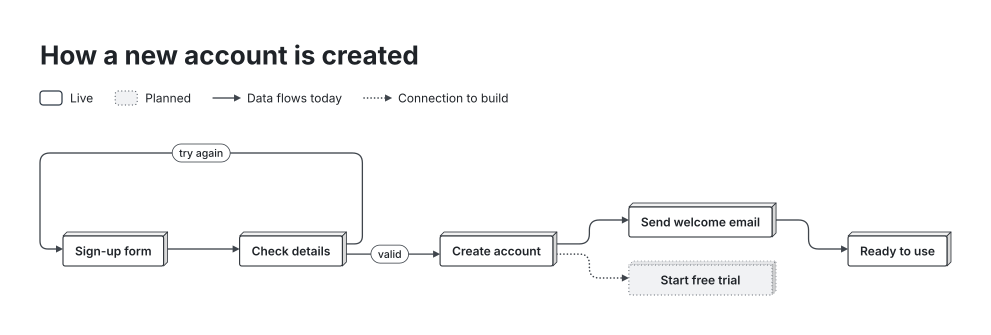
The check: 0 layout problems
A %%{init: {"flowchart": {"curve": "step"}}}%% line does the same.
How do I draw my own flowchart?
- Install open-diagram:
pip install open-diagram. - Save your flowchart as a
.mmdfile, or open the example in the editor and change it in your browser. - Run
open-diagram check yourfile.mmd. If it names a line of the file, fix that line. - Run
open-diagram draw yourfile.mmdto write the SVG and PNG.
Mermaid files take no icons. For icons, move the diagram to JSON or Python.