Systems map diagram with live and planned parts, from Python
This page is for anyone who needs a whole system in one picture. Its systems map shows Quillfin Video, an invented video platform, with the owner and state of every part, drawn from one Python script.
Updated
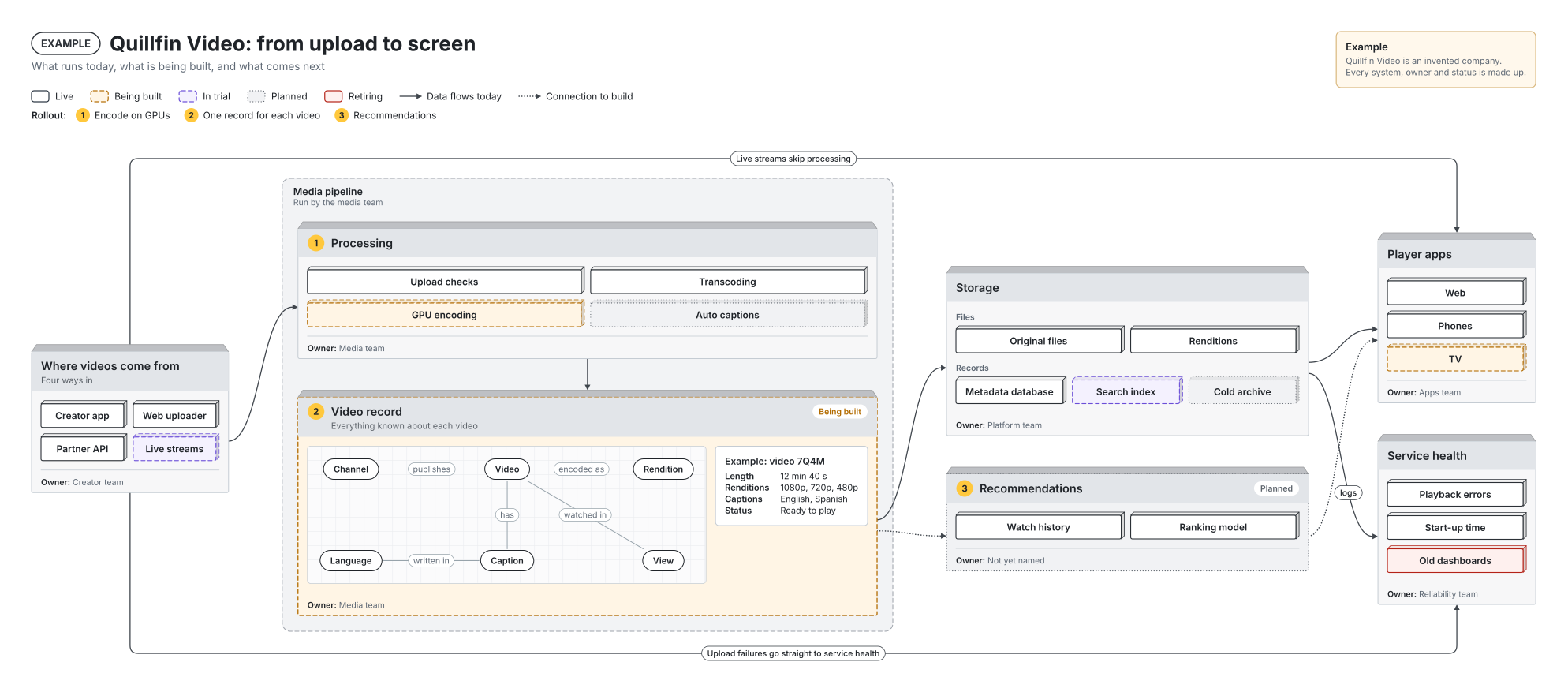
Quillfin Video: from upload to screen. Drawn by open-diagram 0.6.2 from examples/systems_map.py: 0 layout problems. Source
The picture as text
Quillfin Video: from upload to screen
What runs today, what is being built, and what comes next
States shown: Live, Being built, In trial, Planned, Retiring. Solid lines: data flows today. Dotted lines: connection to build.
Rollout: 1. Encode on GPUs (Processing); 2. One record for each video (Video record); 3. Recommendations (Recommendations).

Blocks, left to right:
- Where videos come from (Four ways in): Creator app; Web uploader; Partner API; Live streams (in trial). Owner: Creator team
- Processing [step 1]: Upload checks; Transcoding; GPU encoding (being built); Auto captions (planned). Owner: Media team
- Video record [step 2, being built] (Everything known about each video): map: Channel publishes Video; Video encoded as Rendition; Video has Caption; Video watched in View; Caption written in Language. example 'Example: video 7Q4M': Length 12 min 40 s; Renditions 1080p, 720p, 480p; Captions English, Spanish; Status Ready to play. Owner: Media team
- Storage: Files: Original files; Renditions. Records: Metadata database; Search index (in trial); Cold archive (planned). Owner: Platform team
- Recommendations [step 3, planned]: Watch history; Ranking model. Owner: Not yet named
- Player apps: Web; Phones; TV (being built). Owner: Apps team
- Service health: Playback errors; Start-up time; Old dashboards (retiring). Owner: Reliability team
Groups:
- Media pipeline (Run by the media team): Processing, Video record
Lines:
- Where videos come from -> Processing
- Processing -> Video record
- Video record -> Storage
- Video record -> Recommendations (connection to build)
- Storage -> Player apps
- Storage -> Service health, labeled "logs"
- Recommendations -> Player apps (connection to build)
- Where videos come from -> Player apps, labeled "Live streams skip processing"
- Where videos come from -> Service health, labeled "Upload failures go straight to service health"
Note: Example. Quillfin Video is an invented company. Every system, owner and status is made up.
What does this systems map show?
A video's path from upload to screen, in four columns. Recommendations is planned, so its panel and both of its lines are dotted. Two lines skip the columns, one along the top and one along the bottom.
When is a systems map useful?
When a team needs one answer, for every part, to "is this live?" and "who runs it?". As work ships, keep the statuses in a small file: change one word and redraw, without touching the script.
Which building blocks draw it?
Seven panels, placed in four columns by d.columns().
Panelis each box.footer=adds the owner line,step=the numbered circle, andstatus=marks the whole panel.Tileslays out the small boxes in a grid:cols=2for two columns,label="Files"to name a section.Tile("GPU encoding", status="building")gives one tile a status. The key lists only the statuses the picture uses.GraphandCard, side by side in aRow, fill the Video record panel with a small map and one worked example.d.group()draws the shaded Media pipeline area.d.link()draws each line, andkind="planned"makes it dotted.via_ysends a line through a lane: a clear strip above or below the panels.steps=on theDiagramwrites the rollout key, andNotethe box at the top right.
How do I make my own?
- Install open-diagram:
pip install open-diagram. - Copy
examples/systems_map.pyand replace the words with your own systems, owners and statuses. - Run
open-diagram check systems_map.py. Each message names the parts and a fix. - Run
open-diagram draw systems_map.pyto write the SVG and PNG.
Can I write it without Python?
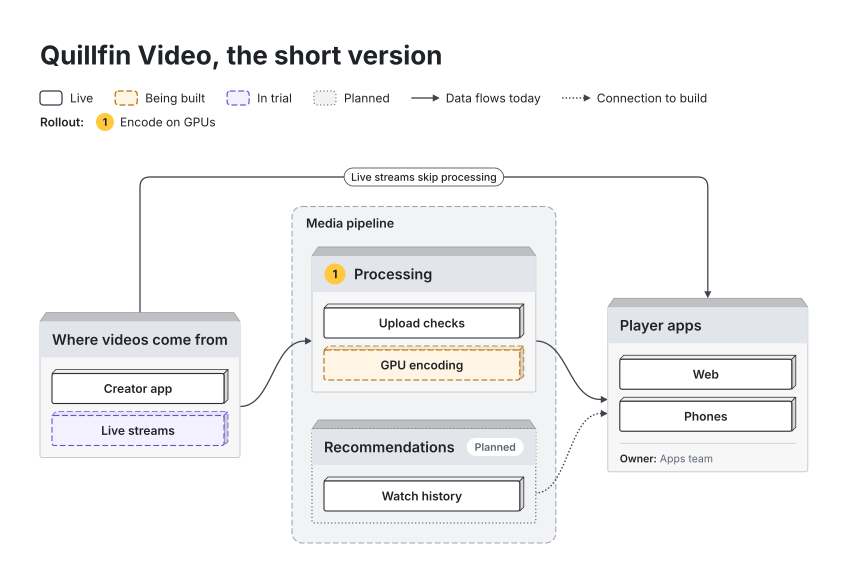
Yes, in JSON, plain data that any language or AI agent can produce. In this short version, "lane": "top" takes the place of via_y:
{
  "title": "Quillfin Video, the short version",
  "steps": [[1, "Encode on GPUs"]],
  "steps_label": "Rollout",
  "columns": [
    [{"id": "in", "title": "Where videos come from", "tiles": ["Creator app", {"label": "Live streams", "status": "trial"}], "cols": 1}],
    [{"id": "proc", "title": "Processing", "step": 1, "tiles": ["Upload checks", {"label": "GPU encoding", "status": "building"}], "cols": 1},
     {"id": "rec", "title": "Recommendations", "status": "planned", "tiles": ["Watch history"], "cols": 1}],
    [{"id": "apps", "title": "Player apps", "tiles": ["Web", "Phones"], "cols": 1, "footer": "Owner: Apps team"}]
  ],
  "groups": [{"label": "Media pipeline", "members": ["proc", "rec"]}],
  "links": [
    {"from": "in", "to": "proc"},
    {"from": "proc", "to": "apps"},
    {"from": "rec", "to": "apps", "kind": "planned"},
    {"from": "in", "to": "apps", "lane": "top", "label": "Live streams skip processing"}
  ]
}
The check: 0 layout problems