Business process map of a furniture store, drawn from Python
This page is for people who map how a business runs. Its process map follows Pinemoor Home, an invented furniture store, from order to doorstep, with the state and owner of every part, drawn from one Python script.
Updated
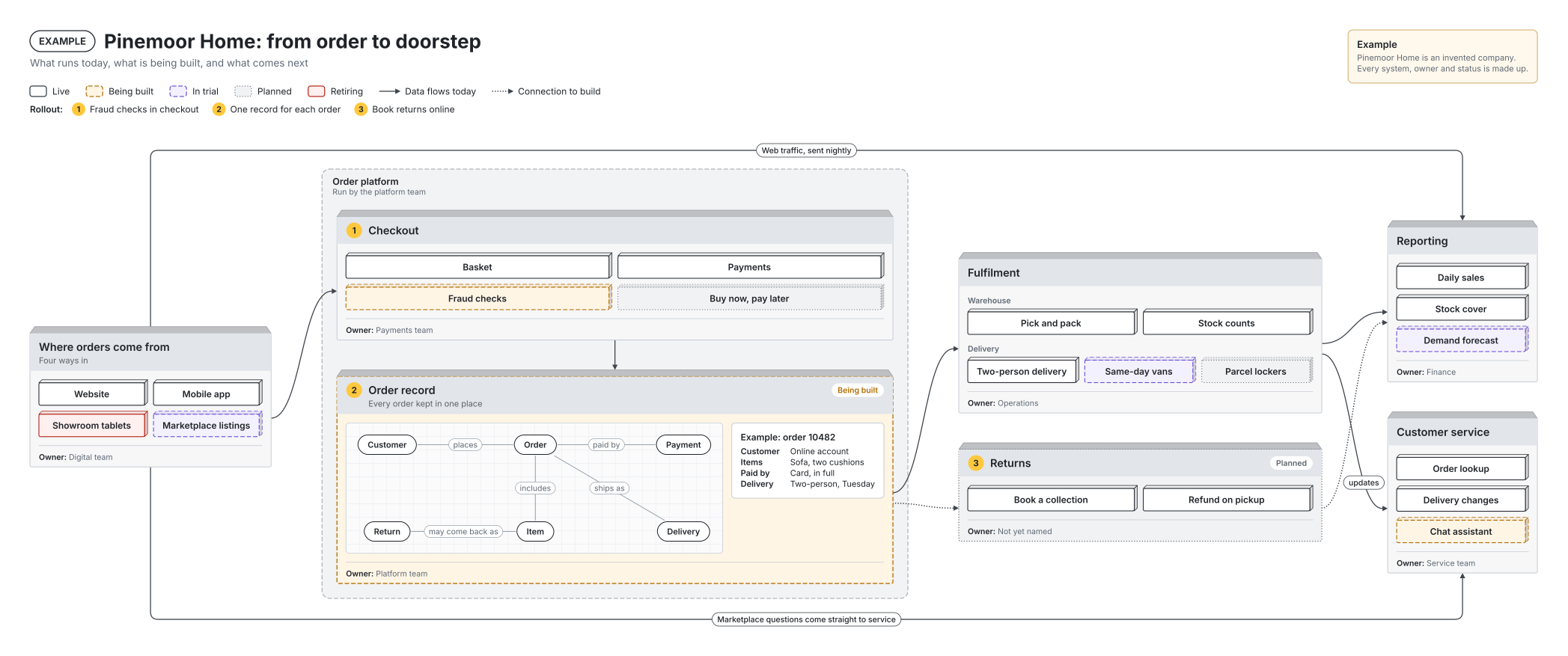
Pinemoor Home: from order to doorstep. Drawn by open-diagram 0.6.2 from examples/business_map.py: 0 layout problems. Source
The picture as text
Pinemoor Home: from order to doorstep
What runs today, what is being built, and what comes next
States shown: Live, Being built, In trial, Planned, Retiring. Solid lines: data flows today. Dotted lines: connection to build.
Rollout: 1. Fraud checks in checkout (Checkout); 2. One record for each order (Order record); 3. Book returns online (Returns).

Blocks, left to right:
- Where orders come from (Four ways in): Website; Mobile app; Showroom tablets (retiring); Marketplace listings (in trial). Owner: Digital team
- Checkout [step 1]: Basket; Payments; Fraud checks (being built); Buy now, pay later (planned). Owner: Payments team
- Order record [step 2, being built] (Every order kept in one place): map: Customer places Order; Order paid by Payment; Order includes Item; Order ships as Delivery; Item may come back as Return. example 'Example: order 10482': Customer Online account; Items Sofa, two cushions; Paid by Card, in full; Delivery Two-person, Tuesday. Owner: Platform team
- Fulfilment: Warehouse: Pick and pack; Stock counts. Delivery: Two-person delivery; Same-day vans (in trial); Parcel lockers (planned). Owner: Operations
- Returns [step 3, planned]: Book a collection; Refund on pickup. Owner: Not yet named
- Reporting: Daily sales; Stock cover; Demand forecast (in trial). Owner: Finance
- Customer service: Order lookup; Delivery changes; Chat assistant (being built). Owner: Service team
Groups:
- Order platform (Run by the platform team): Checkout, Order record
Lines:
- Where orders come from -> Checkout
- Checkout -> Order record
- Order record -> Fulfilment
- Order record -> Returns (connection to build)
- Fulfilment -> Reporting
- Fulfilment -> Customer service, labeled "updates"
- Returns -> Reporting (connection to build)
- Where orders come from -> Reporting, labeled "Web traffic, sent nightly"
- Where orders come from -> Customer service, labeled "Marketplace questions come straight to service"
Note: Example. Pinemoor Home is an invented company. Every system, owner and status is made up.
What does this business map show?
Orders come in four ways and pass through checkout and the order record, which share a shaded group run by the platform team. Fulfilment splits into Warehouse and Delivery. Returns is planned, and its owner line reads "Not yet named".
The order record panel shows the data twice: a small map of customer, order, item, payment, delivery and return, and beside it order 10482 with made-up values.
Is it the same code as a software map?
Yes. business_map.py has the same structure as systems_map.py, the systems map example: four columns, one group, the same blocks, two lanes. Only the words differ.
How do I keep the statuses current?
Put them in a small file and pass it when you draw. When work ships, change one word in the file, and leave the script alone.
{"Fraud checks": "live", "Parcel lockers": "building"}open-diagram draw business_map.py --statuses states.jsonNames match panel titles, panel ids and tile labels, and live returns a part to the plain look. A misspelled name stops the command before anything is drawn:
error: no panel or tile is named 'Parcel locker'How do I make my own?
After pip install open-diagram, copy examples/business_map.py and replace the words with your own teams, steps and owners. Where nobody owns a part yet, write "Owner: Not yet named", as Returns does, so the gap shows. Then run open-diagram check business_map.py and open-diagram draw business_map.py.
When is a business process map useful?
When several teams need one view of how an order or a request moves from a customer to a result. The numbered rollout adds what changes next, in order.