Convert a Mermaid flowchart to a checked SVG and PNG
This guide is for people who already have Mermaid flowcharts and want them drawn with measured labels and checked for layout problems.
Updated
How do I convert a flowchart?
Run open-diagram draw on the .mmd or .mermaid file. open-diagram lays the flowchart out again, measures every label and checks the layout, as for any other diagram.
open-diagram draw returns.mmdThat writes returns.svg and returns.png next to the file. This flowchart draws the picture below it:
---
title: How a parcel return is handled
---
flowchart LR
  request[Return request] --> label[Print label]
  label --> dropoff[Drop at locker]
  dropoff --> inspect{Inspect item}
  inspect -->|passes| refund[Refund card]
  inspect -->|fails| reject[Send back]
  inspect -.-> resell[Resell online]
  class resell planned
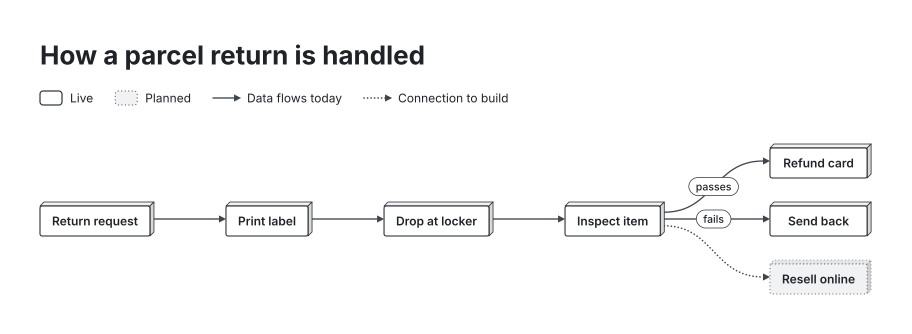
The check: 0 layout problems
The title comes from the front matter. Without one, the title is "Flowchart", and --title sets another.
What carries over?
The structure and the states:
flowchartandgraph, withLR,RL,TD,TBorBT.RLandBTare drawn as the mirror image ofLRandTD.- Nodes in any bracket shape, with or without quotes.
- Chains (
A --> B --> C) and&(A & B --> C). - Line labels:
-->|text|,-- text -->,-. text .->and== text ==>. - Dotted lines (
-.->), which become connections still to build, drawn dotted. - Each top-level
subgraph…end, which becomes a shaded group with its own band. - A class named after a state:
A:::buildingorclass A,B planned. The states are live, building, trial, planned and retiring. - Mermaid's
curvesetting.step,stepBeforeandstepAfterdraw right-angle lines. %%comments, and;between statements.
What changes?
The look and the layout:
- Every node is drawn as the same box. The diamond
{Inspect item}above became a plain box. <br/>becomes a space, and the label wraps to fit.- Thick lines (
==>), lines with no arrowhead (---), circle and cross ends (--o,--x) and two-way arrows (<-->) are all drawn as ordinary one-way arrows. - A subgraph inside another subgraph is merged into the outer one.
- Class names that are not states are ignored, and so are
classDef,style,linkStyle,clickanddirection. - Markdown strings and icons such as
fa:fa-carare shown exactly as typed. - open-diagram chooses the layout. Boxes go in steps by the longest chain of arrows that leads to each one. Lines that skip a step or point backwards run in a lane above or below the picture.
What is not read?
Other Mermaid diagram types, the newer shape syntax and D2 files. For a Mermaid file it cannot read, the command stops and names the line:
$ open-diagram check seq.mmd
error: line 1: expected 'flowchart LR' or 'graph TD' first, got 'sequenceDiagram'

$ open-diagram check shape.mmd
error: line 2: cannot read the shape of node 'A@{ shape: rect }'
Mermaid input takes no icons either. For cloud icons, write JSON.
Can an agent or a script convert it?
Yes. The MCP server's check and draw tools take Mermaid text as well as JSON. From Python, from_mermaid(text) returns the Diagram, and from_mermaid(text, routing="orthogonal") draws right-angle lines.
The Mermaid comparison says when Mermaid is the better choice.