Draw right-angle lines in diagrams from Python, JSON or Mermaid
This guide is for people who want lines that run straight and turn at right angles, in place of the default curves. Each format has one setting for it.
Updated
How do I turn on right-angle lines?
Set routing to orthogonal, which means straight runs that meet at right angles. The default is curved.
| Format | Setting |
|---|---|
| JSON | "routing": "orthogonal" at the top level |
| Python | Diagram("Title", routing="orthogonal") |
| Mermaid | curve: step in the front matter, or a %%{init: {"flowchart": {"curve": "step"}}}%% line |
{
  "title": "How sensor readings reach a city air-quality map",
  "routing": "orthogonal",
  "columns": [
    [{"id": "sensors", "title": "Street sensors", "tiles": ["Air quality", "Noise", "Traffic counts"], "cols": 1}],
    [{"id": "intake", "title": "Intake service", "tiles": ["Checks readings", "Drops duplicates"], "cols": 1}],
    [{"id": "store", "title": "Readings store", "tiles": ["Last 90 days"], "cols": 1},
     {"id": "alerts", "title": "Alerts", "tiles": ["Text messages"], "cols": 1},
     {"id": "map", "title": "Public map", "tiles": ["Hourly tiles"], "cols": 1}]
  ],
  "links": [
    {"from": "sensors", "to": "intake"},
    {"from": "intake", "to": "store"},
    {"from": "intake", "to": "alerts", "label": "over limit"},
    {"from": "intake", "to": "map"}
  ]
}
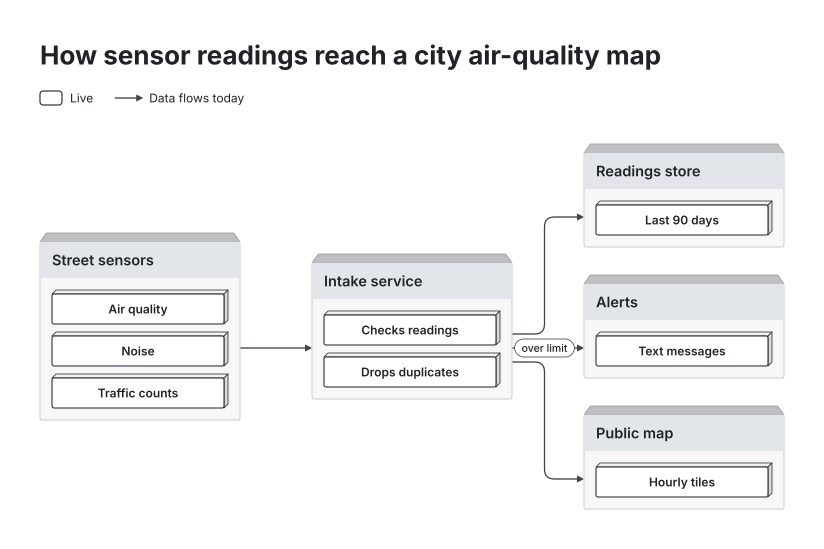
The check: 0 layout problems
What changes in the picture?
Only the lines. The blocks keep their places, and each corner of a line is slightly rounded. When two blocks face each other and their sides overlap, the line runs straight across, as it does into "Intake service" above. Lines that would share the same gap each get their own track, 12 px apart, ordered so they cross as little as possible. The check works the same way for both kinds of line.
Can I set it for one line only?
Yes. Give the link its own routing, curved or orthogonal, and it overrides the diagram's setting:
from open_diagram import Diagram, Panel

d = Diagram("Sensor readings", routing="orthogonal")
sensors = d.add(Panel("Street sensors", ["Air quality", "Noise"]))
intake = d.right_of(sensors, Panel("Intake service", ["Checks readings"]), align="center")
d.link(sensors, intake, routing="curved")
In JSON, put the same key on the link: {"from": "sensors", "to": "intake", "routing": "curved"}. A line sent through a lane ("lane": "top"), or given via_x or via_y, always turns at right angles.
How do I do it in Mermaid?
Use Mermaid's own curve setting. step, stepBefore and stepAfter draw right-angle lines. Any other curve draws smooth curves.
---
title: Sign-in with right-angle lines
config:
  flowchart:
    curve: step
---
flowchart LR
  login[Sign-in page] --> check[Check password]
  check -->|ok| home[Home page]
  check -->|wrong| retry[Try again]
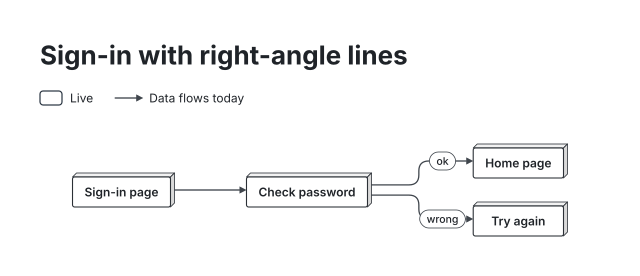
The check: 0 layout problems
From Python, from_mermaid(text, routing="orthogonal") does the same without touching the file.
Which lines does it leave alone?
The lines inside a Graph, a small map drawn inside a panel, with nodes on a grid. Its lines run straight from node to node, diagonals included, whatever the diagram's routing. To avoid a diagonal in a Graph, place the two nodes in the same row or column of its grid.