open-diagram vs Mermaid for architecture diagrams
This page is for people choosing between Mermaid and open-diagram to write an architecture diagram as text. It shows one flow drawn by both, and how open-diagram reads a Mermaid flowchart.
Updated
What is the difference?
Mermaid draws many kinds of diagram from one text syntax. open-diagram draws one kind, made of boxes, lines and groups, and checks its own layout.
How do the two draw the same flow?
Each tool drew the same photo upload flow from its own file, with default settings.
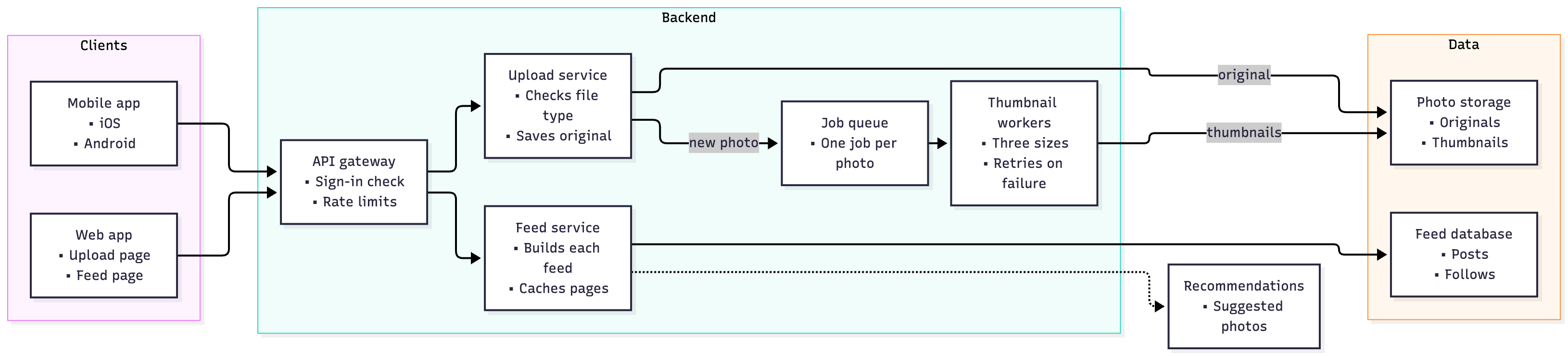
Mermaid. Made in 0.76 s. Source
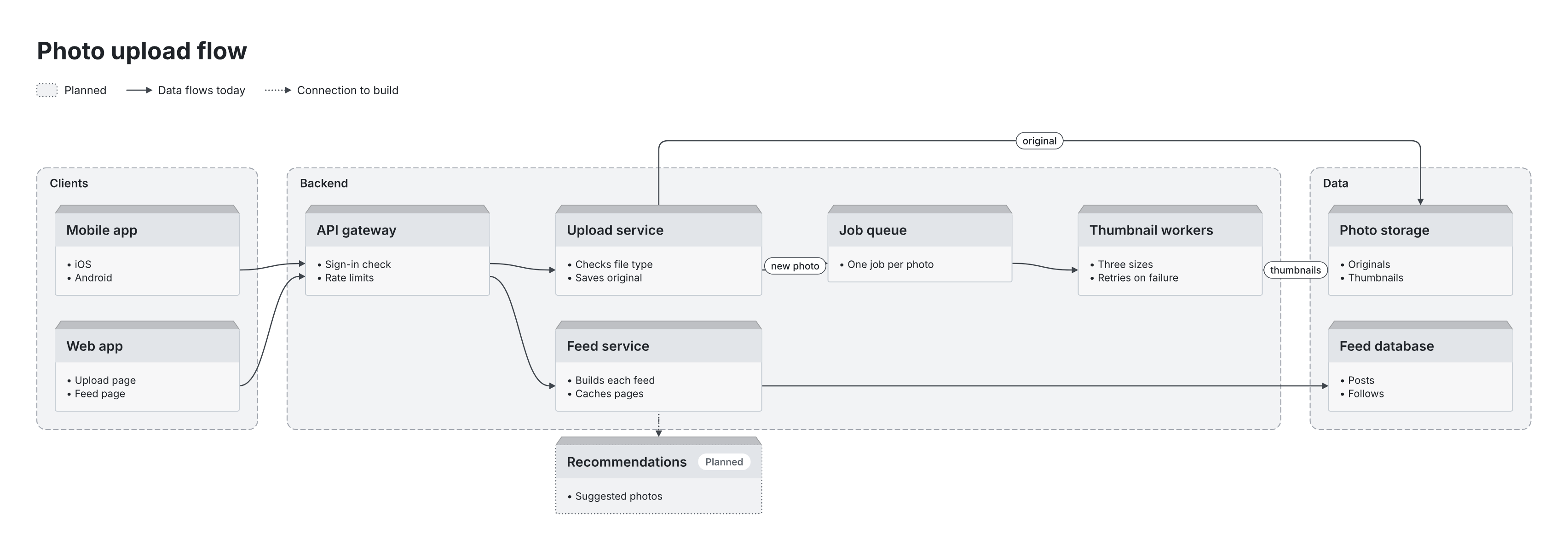
open-diagram. Made in 0.59 s. 0 layout problems. Source
Mermaid's command line tool (CLI) 12.2.0 and open-diagram 0.5.0, timed on one Mac on November 23, 2026, median of five runs. The open-diagram file sets the columns, a lane above the boxes and the ends of one line; the Mermaid file leaves placement to Mermaid. Both files are in the library's docs/compare folder. Given the Mermaid file itself, open-diagram 0.6.2 reports 0 layout problems (checked November 25, 2026).
When should you pick Mermaid?
Pick Mermaid when the diagram sits in a Markdown file. GitHub draws a mermaid code block in place, so the picture changes in the same pull request as the text.
Its files are short: the photo upload flow takes 27 lines of Mermaid, against 183 lines of formatted JSON for open-diagram. It also draws sequence diagrams and Gantt charts, which open-diagram cannot.
Its official MCP server, a small program that lets an AI app such as Claude Code call the tool, checks Mermaid syntax and renders a PNG for anyone with a free Mermaid account.
When does open-diagram fit better?
open-diagram fits a dense map that must read well the first time: many boxes, a few lines of detail in each, owners, states such as live or planned, and lines clear of every box.
It measures each label before placing anything, so each box fits its words. Then open-diagram check names every layout problem by the labels involved:
'Storage' and 'Recommendations' are only 9 px apart (minimum 16)An AI agent reads the message, moves a box and checks again, without looking at the picture. open-diagram's MCP server gives the agent check and draw, and runs on your computer.
Its SVG, a picture file that stays sharp at any size, draws text as shapes, so it looks the same in a browser, PowerPoint, Keynote or Figma. open-diagram is free and MIT licensed.
Can I move from Mermaid to open-diagram?
Yes, for flowcharts. open-diagram reads a Mermaid flowchart or graph file and lays it out again:
open-diagram draw flow.mmdTop-level subgraphs become shaded groups, dotted lines become connections still to build, and a class named after a state, such as A:::planned, sets that state. Every node becomes the same box, and <br/> becomes a space. Thick, two-way and open-ended lines become plain arrows. Other Mermaid kinds, such as sequenceDiagram, stop the command with a message that names the line. The Mermaid reference has the full list.
How do they compare on input, output, license and price?
| open-diagram | Mermaid | |
|---|---|---|
| Input | Python, JSON, Mermaid flowcharts | Mermaid text |
| Layout | You choose the columns; it spaces the boxes and routes the lines. For Mermaid it chooses the columns too | Automatic |
| Checks layout | Yes, and names each problem | Not in its docs. Its MCP server checks syntax |
| Output | SVG, PNG | SVG. The CLI also writes PNG and PDF |
| MCP server | Yes, runs on your computer | Yes, hosted; needs a free Mermaid account |
| License | MIT | MIT |
| Price | Free | Free. Paid plans from "$10 per user / month", "Billed Annually" |
Sources: open-diagram's README, AI agents and Mermaid docs. Mermaid's introduction (diagram kinds, SVG), repository (license), CLI (PNG and PDF), MCP server and pricing. GitHub's diagram docs say where GitHub draws Mermaid. "Not in its docs" means the linked pages do not mention it.
Checked November 25, 2026