open-diagram vs Excalidraw for architecture diagrams
This page is for people who sketch architecture in Excalidraw and want to know when a finished diagram should come from text instead. It shows the same flow drawn by both.
Updated
What is the difference?
On Excalidraw's whiteboard you draw on an open canvas, and every shape comes out looking hand-drawn. open-diagram takes a file instead, in Python, JSON or a Mermaid flowchart, and places the boxes, routes the lines and checks the layout itself.
How do the two draw the same flow?
Excalidraw converted the Mermaid version of a photo upload flow; open-diagram drew its own JSON version. Both used default settings.
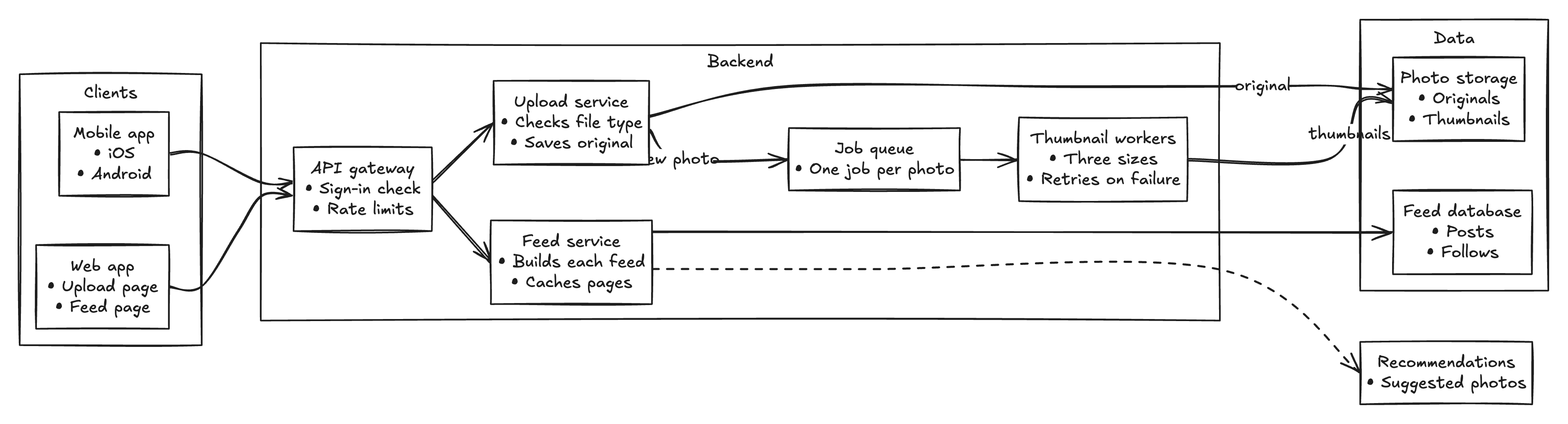
Excalidraw. Made in 0.020 s inside the browser, from the Mermaid file. Source
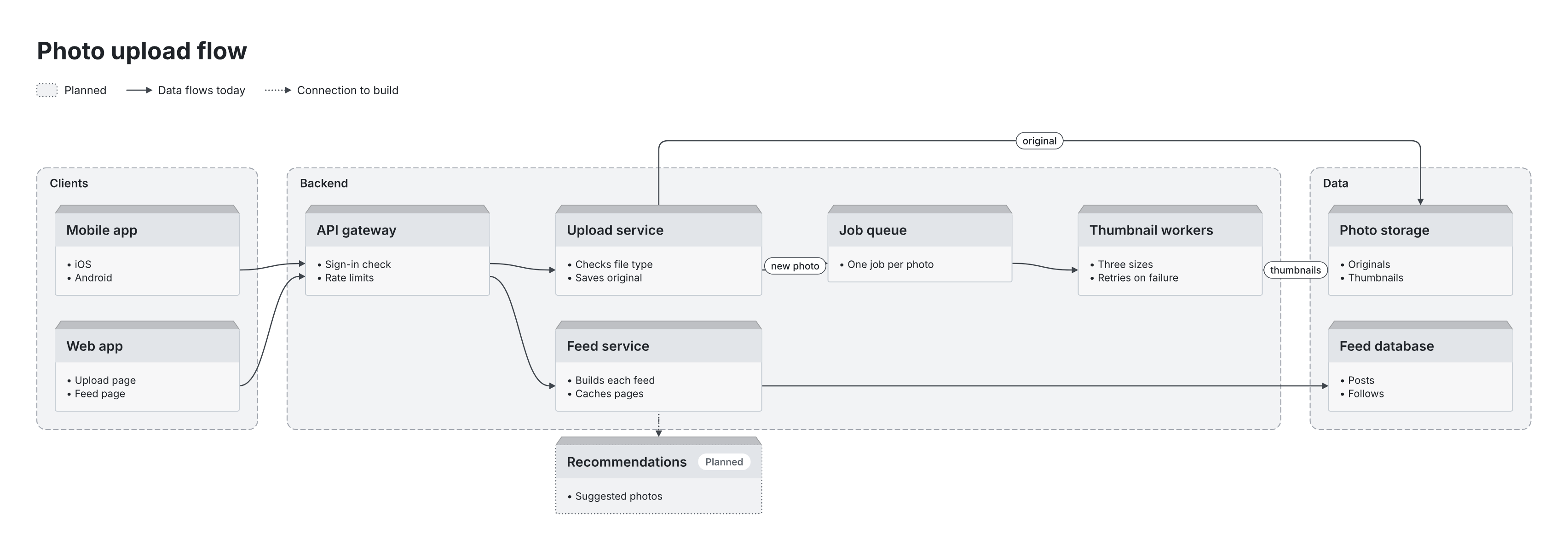
open-diagram. Made in 0.59 s. 0 layout problems. Source
Excalidraw 0.18.1, through its Mermaid converter (mermaid-to-excalidraw 3.6.0) inside Chrome, and open-diagram 0.5.0 from the command line, timed on one Mac on November 23, 2026, median of five runs. The open-diagram file sets the columns, a lane above the boxes and the ends of one line; the Mermaid file leaves placement to the converter. Both files are in the library's docs/compare folder.
When should you pick Excalidraw?
Pick Excalidraw to sketch: you move anything with the mouse as the idea changes.
The editor is free and MIT licensed, and it exports PNG, SVG (a picture file that stays sharp at any size) and an open .excalidraw file. The free plan includes ten generative AI requests a day, and the pricing page lists text to diagram and Mermaid to Excalidraw.
Excalidraw+ costs "$6 a month per user" billed annually, or "$7 a month per user" monthly. It adds an MCP server, in public beta, that lets an AI app draw into your Excalidraw+ workspace. That server "reports layout problems (text overflowing its box, arrows through shapes, overlaps) with each write". There is also an open-source Excalidraw MCP server under the MIT license.
When does open-diagram fit better?
For a finished architecture map, open-diagram fits better: boxes with several lines of detail, owners, states such as live or planned, and lines that must stay clear of every box. Its layout check is free and runs on your computer:
open-diagram check plan.jsonEach problem comes back as a sentence that names the parts, such as 'Storage' and 'Recommendations' are only 9 px apart (minimum 16), so an AI agent can fix the layout without seeing it. open-diagram's MCP server gives the agent that check.
The file is text, so it can sit next to the code and change in the same pull request. open-diagram is free and MIT licensed.
Can I move from Excalidraw to open-diagram?
Only by hand: open-diagram does not read .excalidraw files. Each shape's label becomes the title of a panel, open-diagram's box; each arrow becomes a link, and each box drawn around others a group.
If the drawing began as Mermaid, draw from that file instead: open-diagram draw flow.mmd reads Mermaid flowcharts.
How do they compare on input, output, license and price?
| open-diagram | Excalidraw | |
|---|---|---|
| Input | Python, JSON, Mermaid flowcharts | A whiteboard; Mermaid and AI text to diagram |
| Layout | You choose the columns; it spaces the boxes and routes the lines | By hand |
| Checks layout | Yes, free, and names each problem | In the Excalidraw+ MCP server |
| Output | SVG, PNG | PNG, SVG, .excalidraw file |
| MCP server | Yes, runs on your computer | Excalidraw+ (public beta); an open-source server |
| License | MIT | MIT |
| Price | Free | Free. Plus "$6 a month per user" annually, "$7 a month per user" monthly |
Sources: open-diagram's README, AI agents and Mermaid docs. Excalidraw's repository (whiteboard, license, exports), pricing (plans, AI requests, MCP), Excalidraw+ (text to diagram), Excalidraw+ MCP docs (layout problems) and the open-source MCP server.
Checked November 25, 2026