open-diagram vs draw.io for architecture diagrams
This page is for people who build architecture diagrams by hand in draw.io. It shows what open-diagram draws from a text file instead, and when draw.io stays the better tool.
Updated
What is the difference?
draw.io is an editor: you drag each shape onto a page and put it where you want. open-diagram has no page. You write the diagram in Python, JSON or a Mermaid flowchart, and it spaces the boxes, routes the lines and checks the result.
What does open-diagram draw from a text file?
This photo upload flow comes from one JSON file that lists the boxes in columns, then the groups and the lines.
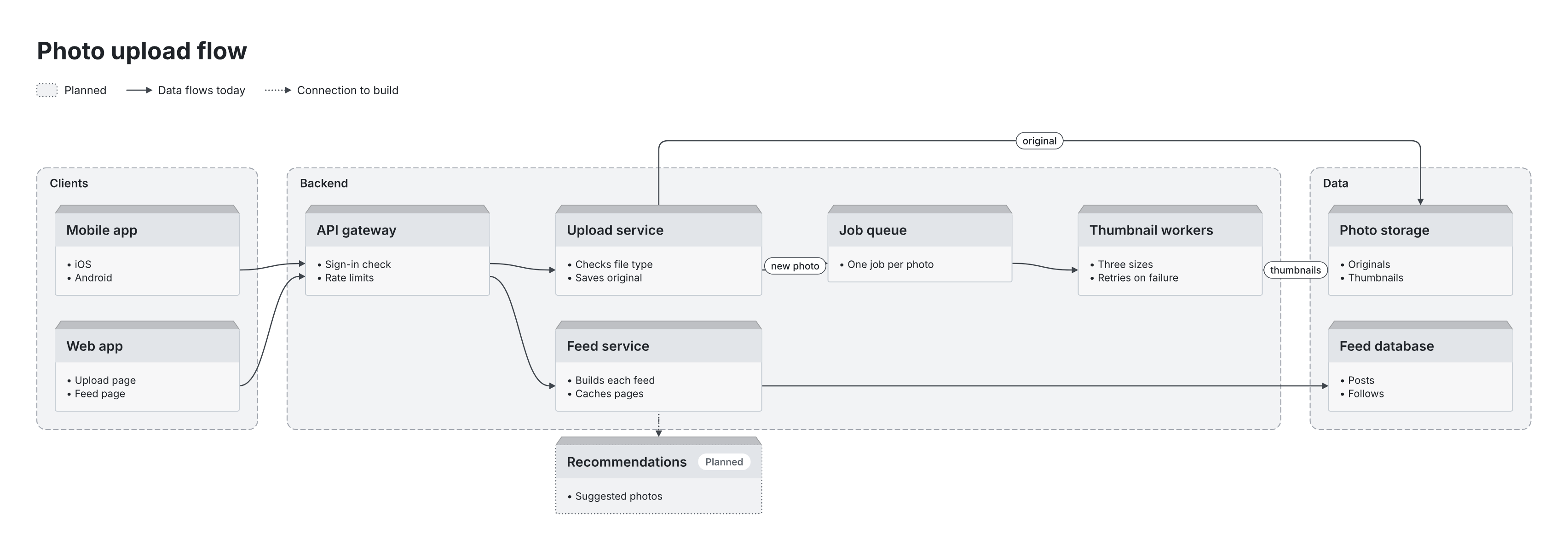
open-diagram. Made in 0.59 s. 0 layout problems. Source
When should you pick draw.io?
Pick draw.io when you want to decide where each shape goes, how each line bends and what each part looks like.
It is free with no sign-up, its source is Apache 2.0 licensed, and it exports SVG (a picture file that stays sharp at any size), PNG and PDF. There is a desktop app, and you choose where files are stored.
draw.io takes text too. It turns a pasted Mermaid diagram into native draw.io shapes you can restyle, though regenerating it from the Mermaid text resets any shape you moved. Its official MCP server, a small program that lets an AI app such as Claude Code call draw.io, takes draw.io XML, Mermaid, PlantUML or CSV and shows the diagram in the chat. The viewer in that server's app includes a layout check.
When does open-diagram fit better?
Pick open-diagram when the diagram sits in a repository next to the code and changes with it. The file is text, so a pull request shows which word or line changed.
States that change often can sit in a small file, such as {"Fraud checks": "live"}. When work ships, change one word and the picture follows. A GitHub Action checks the diagrams on every push, fails if a layout problem appears, and can redraw them.
When an AI agent does the drawing, open-diagram check names each problem by the labels involved, such as two boxes too close or a line through a box, so the agent can fix the layout without seeing it. open-diagram is free and MIT licensed.
Can I move from draw.io to open-diagram?
Only by hand: open-diagram does not read draw.io files. Each shape's label becomes the title of a panel, open-diagram's box; each connector becomes a link, and each container a group.
If the diagram started as Mermaid, draw.io keeps the Mermaid source, and open-diagram draw flow.mmd draws a Mermaid flowchart.
How do they compare on input, output, license and price?
| open-diagram | draw.io | |
|---|---|---|
| Input | Python, JSON, Mermaid flowcharts | An editor; also turns Mermaid into shapes |
| Layout | You choose the columns; it spaces the boxes and routes the lines | By hand |
| Checks layout | Yes, and names each problem | In the viewer of its MCP server's app |
| Output | SVG, PNG | SVG, PNG, PDF |
| MCP server | Yes, runs on your computer | Yes, official; takes XML, Mermaid, PlantUML, CSV |
| License | MIT | Apache-2.0 |
| Price | Free | Free |
Sources: open-diagram's README, command line and AI agents docs. draw.io's home page (free, no sign-up, exports, desktop app, storage), repository (license), Mermaid post (native shapes, layout reset), MCP server (inputs) and its app README (layout check).
Checked November 25, 2026