open-diagram vs D2 for architecture diagrams
This page is for people weighing D2's own diagram language against open-diagram for an architecture diagram written as text. It times both on one flow.
Updated
What is the difference?
D2 has three layout engines and exports to SVG (a picture file that stays sharp at any size), PNG, PDF, PowerPoint, GIF and plain text. open-diagram reads Python, JSON or a Mermaid flowchart, measures every label from the font, and checks the finished layout.
How do the two draw the same flow?
Each tool drew the same photo upload flow from its own file, with default settings.
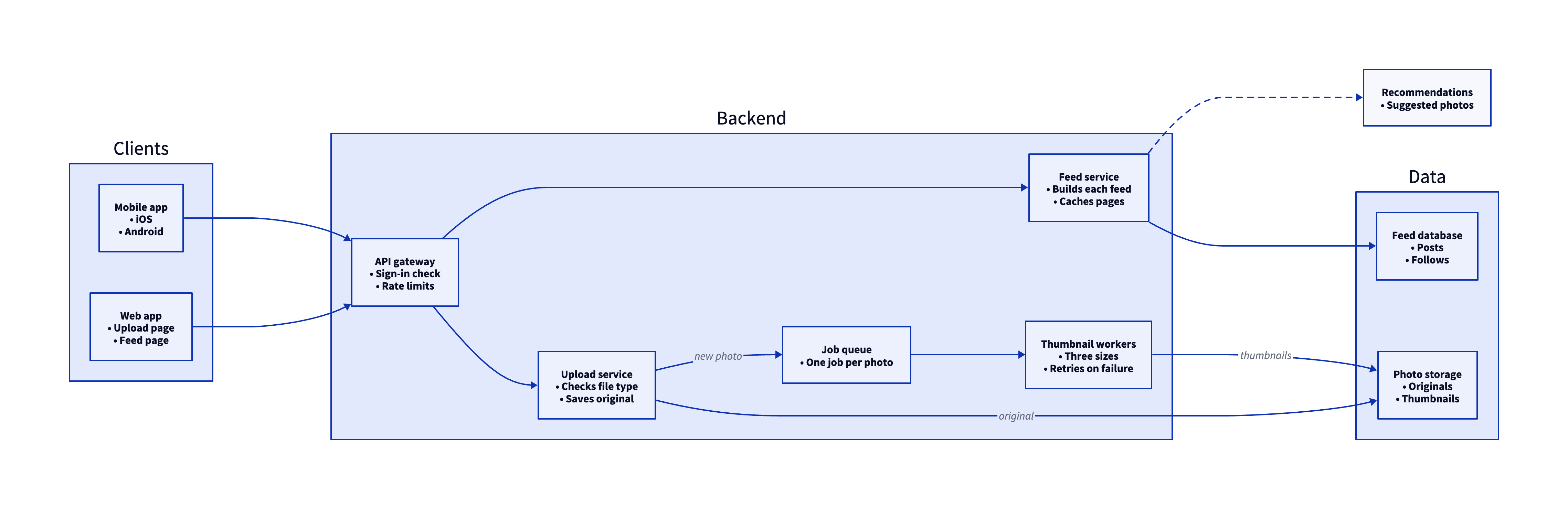
D2. Made in 0.017 s. Source
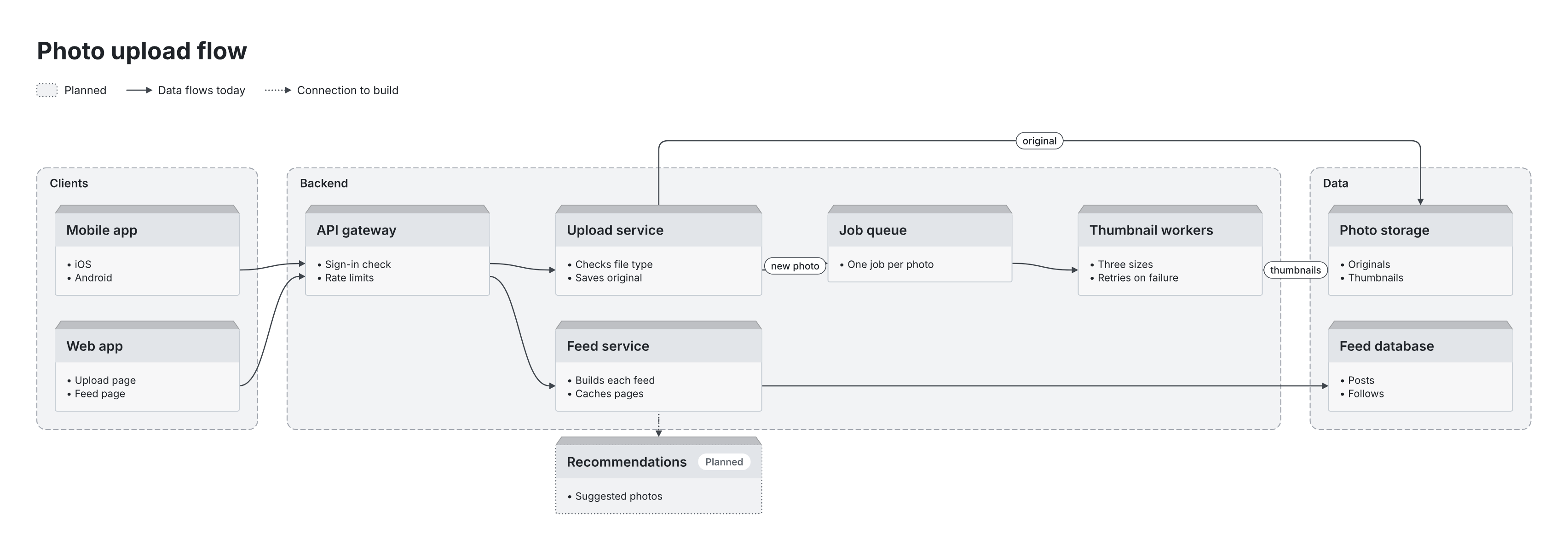
open-diagram. Made in 0.59 s. 0 layout problems. Source
D2 0.9.0 and open-diagram 0.5.0, timed on one Mac on November 23, 2026, median of five runs. The open-diagram file sets the columns, a lane above the boxes and the ends of one line; the D2 file leaves placement to D2. Both files are in the library's docs/compare folder.
When should you pick D2?
Pick D2 when speed matters. It drew this flow in 0.017 s; open-diagram took 0.59 s. D2 also writes PNG without a browser, where open-diagram needs Chrome, Chromium or Edge.
The flow takes 27 lines of D2, against 183 lines of formatted JSON for open-diagram.
For slides, its docs suggest the PowerPoint and GIF exports for diagrams built in layers, scenarios or steps.
You choose the layout engine: dagre (the default), ELK, or TALA, which its makers designed for software architecture diagrams. TALA is closed source and needs a license for commercial use. Without one, it draws a watermark. Try D2 in a browser at play.d2lang.com.
When does open-diagram fit better?
Pick open-diagram when an AI agent writes the diagram. After each draft, open-diagram check names every overlap, cramped gap and line through a box, and the agent fixes what was named. Its MCP server, a small program that lets an AI app such as Claude Code call open-diagram, runs on your computer.
Each box, called a panel, can carry more than a name: sections of text, tiles (small boxes inside it), an owner, and a state such as live, being built or planned. The key lists only the states in use. Any programming language can write the JSON, and four templates for AWS, Azure and Google Cloud give a finished start. open-diagram is free and MIT licensed.
Can I move from D2 to open-diagram?
Only by hand: open-diagram has no D2 reader. Each D2 shape becomes a panel, each container a group, and each -> a link with the same label. A dashed line becomes a link of kind planned. The docs/compare folder has the photo upload flow as photo-upload.d2 and as photo-upload.json, to read side by side.
How do they compare on input, output, license and price?
| open-diagram | D2 | |
|---|---|---|
| Input | Python, JSON, Mermaid flowcharts | D2 text |
| Layout | You choose the columns; it spaces the boxes and routes the lines | Automatic, with three engines: dagre (default), ELK, TALA |
| Checks layout | Yes, and names each problem | Not in its docs |
| Output | SVG, PNG | SVG, PNG, PDF, PowerPoint, GIF, ASCII text |
| MCP server | Yes, runs on your computer | Not in its docs |
| License | MIT | MPL-2.0 |
| Price | Free | Free. TALA "requires a license for any commercial use" |
Sources: open-diagram's README, AI agents and JSON docs. D2's home page and repository (license, engines, playground), exports (formats, PNG without a browser, slides), layouts and the TALA repository (license terms, watermark). "Not in its docs" means the linked pages do not mention it.
Checked November 25, 2026