open-diagram vs the Python diagrams library by mingrammer
This page is for Python users choosing between two libraries that draw architecture as code: diagrams, by mingrammer, and open-diagram. It shows the same small system written in each.
Updated
What is the difference?
mingrammer's diagrams draws each part as a cloud provider's icon, and Graphviz, a separate layout program, lays the picture out. open-diagram draws each part as a box of text, with a title, sections, an owner and a state. It measures every label and checks the layout, naming each problem.
How is the same system written in each?
mingrammer's quick start draws a load balancer, a web server and a database:
# diagram.py
from diagrams import Diagram
from diagrams.aws.compute import EC2
from diagrams.aws.database import RDS
from diagrams.aws.network import ELB

with Diagram("Web Service", show=False):
    ELB("lb") >> EC2("web") >> RDS("userdb")
The same three parts in open-diagram, with a line of detail in each:
from open_diagram import Diagram, Panel


def build():
    d = Diagram("Web service")
    lb = d.add(Panel("Load balancer", ["Spreads requests"]))
    web = d.right_of(lb, Panel("Web server", ["Serves pages", "Checks sign-in"]), align="center")
    db = d.right_of(web, Panel("User database", ["Accounts", "Sessions"]), align="center")
    d.link(lb, web)
    d.link(web, db)
    return d
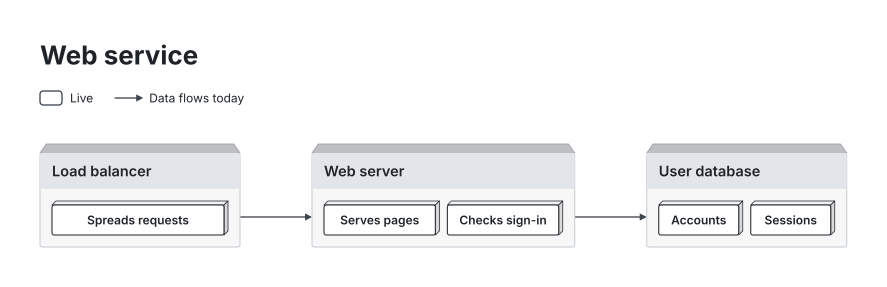
The check: 0 layout problems
mingrammer's version is shorter: one line chains the three parts.
When should you pick mingrammer's diagrams?
Pick it when the icons carry the meaning. Its providers include AWS, Azure, Google Cloud, Kubernetes, Alibaba Cloud and Oracle Cloud, plus on-premises, SaaS and programming nodes. open-diagram ships 20 built-in icons for AWS, Azure and Google Cloud; more come from icon lists that point to files you download.
In its code, >> draws a line, and with Cluster("DB Cluster"): groups the nodes inside it. Graphviz decides where everything goes, and you can pass Graphviz settings through. It writes PNG by default, or JPG, SVG (a picture file that stays sharp at any size), PDF or DOT, Graphviz's own text format.
When does open-diagram fit better?
Pick open-diagram when each box has to say more than its name: what a service does, who owns it, whether it is live, being built or planned. The key lists only the states the picture uses.
When the layout has to be right without a person checking the picture, open-diagram check names each problem by the labels involved, such as two boxes too close or a line through a box. It exits with 1, so a script or a GitHub Action can stop on it.
It needs no Graphviz: pip installs everything the SVG needs, and only PNG also needs Chrome, Chromium or Edge. The same diagram can also be JSON or a Mermaid flowchart, and an MCP server lets an AI app such as Claude Code draw and check it. open-diagram is free and MIT licensed.
Can I move from mingrammer's diagrams to open-diagram?
Only by hand, but both are Python, so the change is line by line. Each node becomes a Panel or a Tile, each >> becomes d.link(a, b), and each Cluster becomes d.group(label, members). A provider icon carries over as an SVG or PNG file passed to Tile(icon=...) or Resource(icon=...).
How do they compare on input, output, license and price?
| open-diagram | mingrammer's diagrams | |
|---|---|---|
| Input | Python, JSON, Mermaid flowcharts | Python |
| Layout | You place the boxes; it spaces them and routes the lines | Automatic, by Graphviz |
| Checks layout | Yes, and names each problem | Not in its docs |
| Output | SVG, PNG | PNG (default), JPG, SVG, PDF, DOT |
| Needs | Python 3.10+; a browser for PNG only | Python 3.9+ and Graphviz |
| MCP server | Yes, runs on your computer | Not in its docs |
| License | MIT | MIT |
| Price | Free | Free |
Sources: open-diagram's README, Python and AI agents docs, and its templates. mingrammer's repository (providers, Graphviz, Python version, license), site, installation (quick start), diagram guide (formats, Graphviz settings) and cluster guide. "Not in its docs" means the linked pages do not mention it. Both are free under the MIT license, which grants use "free of charge".
Checked November 25, 2026