Diagram boxes too close or overlapping: how to fix it
The message means two blocks sit closer than 16 px, the theme's min_gap, or that one covers part of the other.
Updated
{"title": "Bookshop orders",
 "gap": 10,
 "columns": [[{"id": "shop", "title": "Online shop", "tiles": ["Basket", "Checkout"]}],
             [{"id": "orders", "title": "Order service", "tiles": ["Orders", "Stock"]}]],
 "links": [{"from": "shop", "to": "orders"}]}
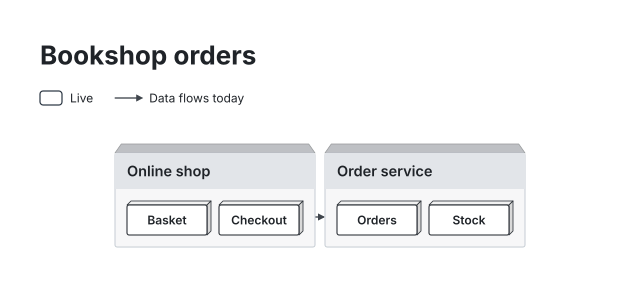
The check: 1 layout problem(s)
'shop' and 'orders' are only 10 px apart (minimum 16)Why does it happen?
A spacing setting or a position set by hand has put two blocks too close:
gaporrow_gapset under 16. Left out, columns sit 72 px apart and rows 28 px.xandyin thepanelslayout, oradd()in Python.
Here the cause is "gap": 10. The check measures the space between every pair of blocks and reports each pair under 16 px on its own line. It names each block by its id, or by its title when it has none. When one block covers another, the message reads 'shop' and 'orders' overlap; move one (right_of() and below() keep a gap).
How do I fix it?
Give the two blocks at least 16 px between them.
- If you set
gaporrow_gap, raise it to 16 or more. In Python, both are arguments ofcolumns(). - If you placed the blocks with
xandy, move one of them. - In Python, place the second block with
right_of()orbelow(), which keep the theme's gap. - Run the check again.
With gap at 40, the check reports 0 layout problems:
{"title": "Bookshop orders",
 "gap": 40,
 "columns": [[{"id": "shop", "title": "Online shop", "tiles": ["Basket", "Checkout"]}],
             [{"id": "orders", "title": "Order service", "tiles": ["Orders", "Stock"]}]],
 "links": [{"from": "shop", "to": "orders"}]}
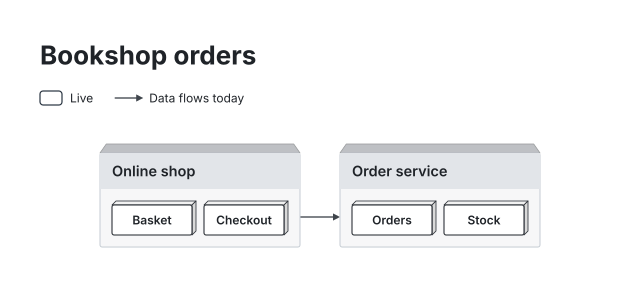
The check: 0 layout problems