Arrow leaves or enters a box on the wrong side: how to fix it
The message means a line leaves its first block, or enters its second, through a side that points away from the other block.
Updated
{"title": "Bookshop returns",
 "columns": [[{"id": "shop", "title": "Online shop", "tiles": ["Returns form"]}],
             [{"id": "store", "title": "Warehouse", "tiles": ["Returns shelf"]}]],
 "links": [{"from": "shop", "to": "store"},
           {"from": "store", "to": "shop", "label": "refund"}]}
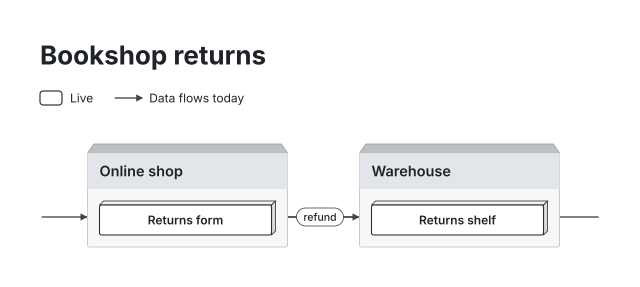
The check: 1 layout problem(s)
line 'store' -> 'shop' leaves 'store' from its right side, facing away from 'shop'; use start='auto' and end='auto', other sides, or a lane (via_x/via_y)Why does it happen?
A line that runs back, from a right column to a left one, keeps the default sides. In the columns layout every line leaves from the right side and enters the left, unless you set start and end.
Here refund loops behind both blocks. The check for crossings skips the two blocks a line joins, so this is the only message about it.
Two blocks side by side, joined top to top, get the same message. The line ends level with its start, never above it.
In the ring and panels layouts the sides default to auto. Lines in a lane skip this check.
How do I fix it?
Let open-diagram pick the sides that face each other, or route the line through a lane.
- Set
"start": "auto"and"end": "auto"on the link. - Or name the sides yourself: for a line from right to left,
"start": "left"and"end": "right". - Or route the line through a lane, with
"lane": "top"or"lane": "bottom". - Run the check again.
With auto on refund, the check reports 0 layout problems:
{"title": "Bookshop returns",
 "columns": [[{"id": "shop", "title": "Online shop", "tiles": ["Returns form"]}],
             [{"id": "store", "title": "Warehouse", "tiles": ["Returns shelf"]}]],
 "links": [{"from": "shop", "to": "store"},
           {"from": "store", "to": "shop", "label": "refund", "start": "auto", "end": "auto"}]}
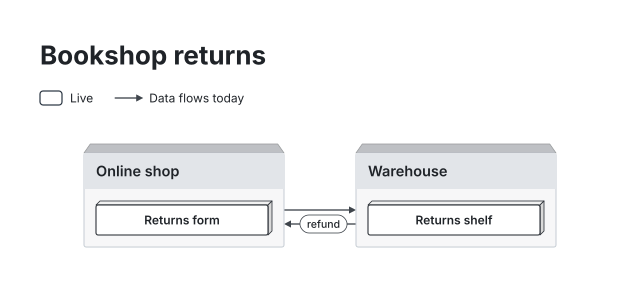
The check: 0 layout problems
In Python, the same line is d.link(store, shop, label="refund", start="auto", end="auto").