Graph label touches a node: how to fix it
The message means a label on a line inside a graph comes within 2 px of a node, so the two run together.
Updated
{"title": "Weather app data",
 "columns": [[{"id": "map", "title": "Where readings go",
               "sections": [{"graph": {"nodes": {"st": "Stations", "fc": "Forecasts"},
                                       "links": [["st", "fc", "hourly readings"]],
                                       "at": {"st": [0, 0], "fc": [1, 0]}}}]}]]}
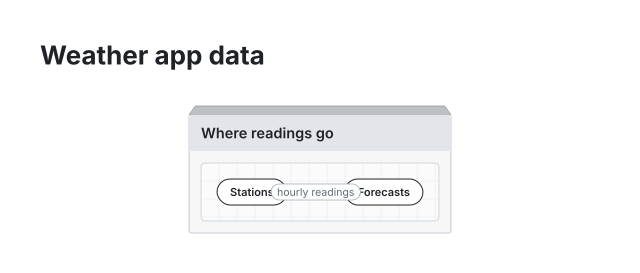
The check: 2 layout problem(s)
graph: the label 'hourly readings' touches the node 'Stations'graph: the label 'hourly readings' touches the node 'Forecasts'Why does it happen?
A graph label stays at the middle of its line, and this one is wider than the space between its two nodes. Unlike a label on a line between blocks, it never slides to a clear spot.
A graph is a section of a panel that puts named nodes on a grid and joins pairs of them with straight lines. Its at gives each node a column and a row. Graph columns are 132 px apart, centre to centre, and each node is as wide as its name plus 26 px. Here Stations and Forecasts leave 58 px between them. The label needs 89 px, so it touches both.
When two labels touch each other, the message reads graph: the labels 'A' and 'B' touch.
How do I fix it?
Give the label more line, or make it shorter.
- Spread the nodes in
at: move one a column further away. Positions can be fractions, such as[1.5, 0], for a smaller step. - Or shorten the label.
- Run the check again.
Here Forecasts moves to column 2, and the check reports 0 layout problems:
{"title": "Weather app data",
 "columns": [[{"id": "map", "title": "Where readings go",
               "sections": [{"graph": {"nodes": {"st": "Stations", "fc": "Forecasts"},
                                       "links": [["st", "fc", "hourly readings"]],
                                       "at": {"st": [0, 0], "fc": [2, 0]}}}]}]]}
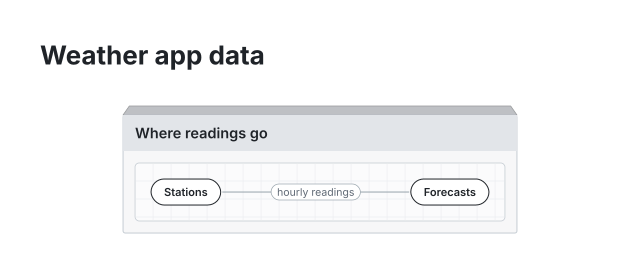
The check: 0 layout problems
In Python, the same section is Graph(nodes, links, at), with at as a dictionary of (column, row) pairs.