Line label covers a box in a diagram: how to fix it
The message means a line's label sits on top of a block.
Updated
{"title": "Bookshop orders",
 "columns": [[{"id": "shop", "title": "Online shop", "tiles": ["Checkout"]}],
             [{"id": "orders", "title": "Order service", "tiles": ["Orders"]}]],
 "links": [{"from": "shop", "to": "orders", "label": "every order, as soon as it is paid"}]}
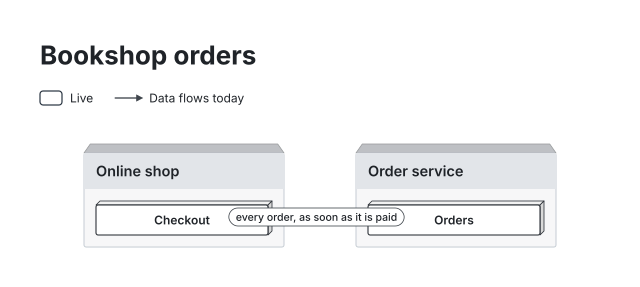
The check: 2 layout problem(s)
the label 'every order, as soon as it is paid' on line 'shop' -> 'orders' sits on 'shop'the label 'every order, as soon as it is paid' on line 'shop' -> 'orders' sits on 'orders'Why does it happen?
The label is wider than the gap its line crosses. A label's box is 18 px tall, and as wide as its text plus 14 px. This one is 175 px wide, and the columns are 72 px apart.
Before the check runs, open-diagram slides each label along its line to the first spot clear of blocks, group titles, other lines and other labels. If no spot is clear, the label stays in the middle of the line, here across both blocks. The check reports each block it covers, one message each.
How do I fix it?
Shorten the label, or widen the gap.
- Shorten the label to a word or two.
- Or raise
gapat the top of the JSON, or incolumns()in Python, so the columns sit further apart. - Run the check again.
A wider gap keeps the long label, but it spreads every column, so the whole picture grows. Here the label drops to two words, and the check reports 0 layout problems:
{"title": "Bookshop orders",
 "columns": [[{"id": "shop", "title": "Online shop", "tiles": ["Checkout"]}],
             [{"id": "orders", "title": "Order service", "tiles": ["Orders"]}]],
 "links": [{"from": "shop", "to": "orders", "label": "when paid"}]}
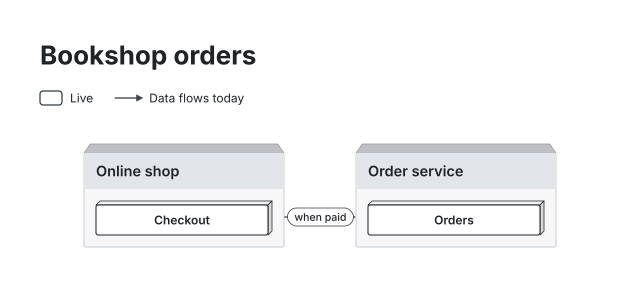
The check: 0 layout problems
In Python, the label is an argument of the link: d.link(shop, orders, label="when paid"). A label that lands on a group's title gets a different message.