Graph line runs through a node: how to fix it
The message means a straight line in a graph passes behind a third node, so the picture hides where the line goes.
Updated
{"title": "Weather app data",
 "columns": [[{"id": "map", "title": "Where readings go",
               "sections": [{"graph": {"nodes": {"st": "Stations", "fc": "Forecasts", "al": "Alerts"},
                                       "links": [["st", "fc"], ["fc", "al"], ["st", "al"]],
                                       "at": {"st": [0, 0], "fc": [1, 0], "al": [2, 0]}}}]}]]}
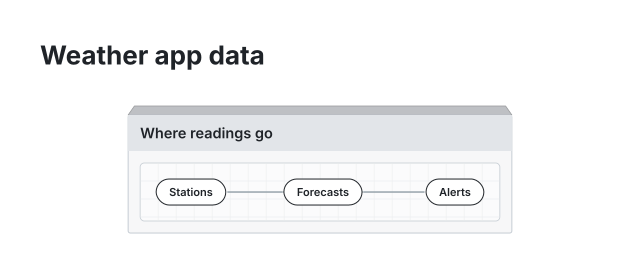
The check: 1 layout problem(s)
graph: the line 'Stations' to 'Alerts' runs through 'Forecasts'Why does it happen?
A third node sits on the straight path between the two nodes a line joins. A graph, a section of a panel with named nodes on a grid, joins pairs of nodes with straight lines. Those lines have no lanes, no sides to choose and no cross_ok, and nodes are drawn over them.
Here the three nodes share row 0, so the line from Stations to Alerts passes behind Forecasts. The picture shows a chain, Stations to Forecasts to Alerts. The check tests points along every graph line against every node except the two the line joins.
How do I fix it?
Move a node off the straight path.
- Move the node in the way to another row in
at. - Or move one end of the line, so the path between the pair is clear.
- Run the check again.
Here Forecasts moves down to row 1, so all three lines show. The check reports 0 layout problems:
{"title": "Weather app data",
 "columns": [[{"id": "map", "title": "Where readings go",
               "sections": [{"graph": {"nodes": {"st": "Stations", "fc": "Forecasts", "al": "Alerts"},
                                       "links": [["st", "fc"], ["fc", "al"], ["st", "al"]],
                                       "at": {"st": [0, 0], "fc": [1, 1], "al": [2, 0]}}}]}]]}
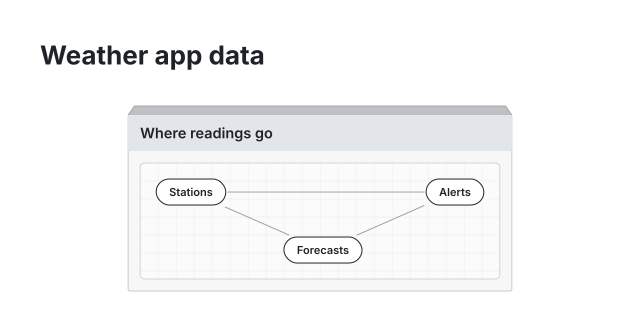
The check: 0 layout problems
Graph rows are 58 px apart, centre to centre, and positions can be fractions, such as [1, 0.5]. In Python, the same section is Graph(nodes, links, at).