Line label covers a group title: how to fix it
The message means a line's label lands on a group's title, the name printed in the top-left corner of the group's dashed area.
Updated
{"title": "Parcel service",
 "row_gap": 44,
 "columns": [[{"id": "web", "title": "Tracking page", "tiles": ["Track a parcel"]},
              {"id": "depot", "title": "Depot", "tiles": ["Sorting belt"]}]],
 "groups": [{"label": "Run by the depot team", "members": ["depot"]}],
 "links": [{"from": "web", "to": "depot", "label": "scans", "start": "bottom", "end": "top"}]}
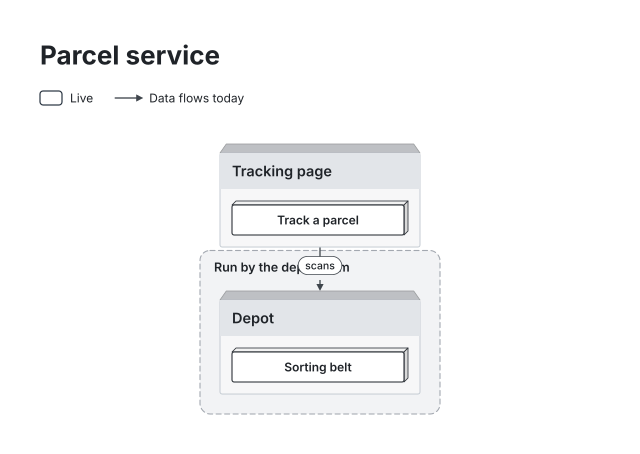
The check: 1 layout problem(s)
the label 'scans' on line 'web' -> 'depot' sits on the title of group 'Run by the depot team'; move the label's line, or the groupWhy does it happen?
The line is too short for its label to clear the group's title. A group's border and title take about 40 px above its first block: 20 px of padding, then a row for the title. Here the two blocks are 44 px apart, so the title sits across the middle of the line.
open-diagram looks along each line for a spot clear of blocks, group titles, other lines and other labels. On this line no spot is clear, so the label stays in the middle and the check reports the title it covers.
The line itself may cross the title. Titles are drawn over lines, on a backing, so the line reads as passing behind.
How do I fix it?
Give the label a stretch of line away from the title.
- Give the line a different start or end side, so it enters the group away from its title.
- Or route the line through a lane.
- Or move the group's blocks further from the line's other end.
- Run the check again.
Here the rows move 90 px apart, so the label finds a spot above the group. The check reports 0 layout problems:
{"title": "Parcel service",
 "row_gap": 90,
 "columns": [[{"id": "web", "title": "Tracking page", "tiles": ["Track a parcel"]},
              {"id": "depot", "title": "Depot", "tiles": ["Sorting belt"]}]],
 "groups": [{"label": "Run by the depot team", "members": ["depot"]}],
 "links": [{"from": "web", "to": "depot", "label": "scans", "start": "bottom", "end": "top"}]}
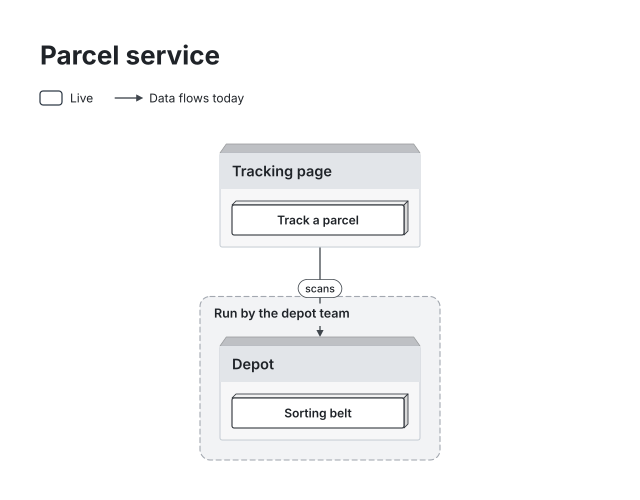
The check: 0 layout problems
In Python, the rows are spaced with row_gap in columns(). A label that lands on a block gets its own message.