Diagram group covers a box that is not in it: how to fix it
The message means a group's dashed area covers a block outside the group, so the block looks like a member.
Updated
{"title": "Bookshop orders",
 "columns": [[{"id": "shop", "title": "Online shop", "tiles": ["Checkout"]}],
             [{"id": "pay", "title": "Card payments", "tiles": ["Card checks"]}],
             [{"id": "orders", "title": "Order service", "tiles": ["Orders"]}]],
 "groups": [{"label": "Our own systems", "members": ["shop", "orders"]}],
 "links": [{"from": "shop", "to": "pay"}, {"from": "pay", "to": "orders"}]}
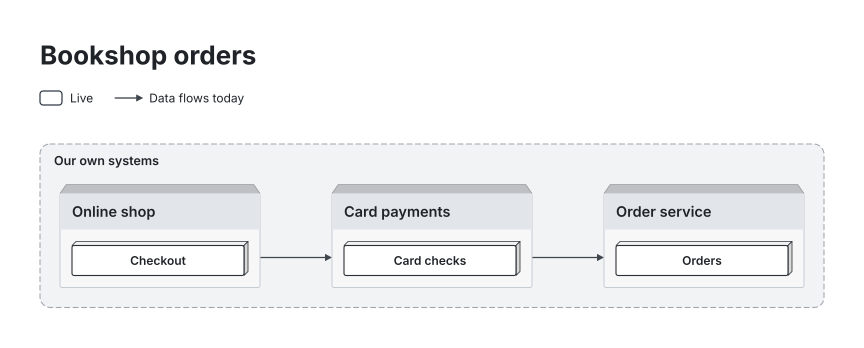
The check: 1 layout problem(s)
group 'Our own systems' overlaps 'pay', which is not in it; add it to the group or move itWhy does it happen?
A group is one rectangle drawn around all its members, so a block between them falls inside. The rectangle reaches 20 px past the members on each side, with a row for the title on top. The check compares it with every block that is not a member.
In the columns layout, a group around the first and third columns covers the second.
How do I fix it?
Make the picture match the group's list of members.
- If the block belongs in the group, add its id to the group's
members, or in Python to the list passed tod.group(). - If it does not, place the members next to each other, in one column or in neighbouring columns.
- Put the other block outside the group's area.
- Run the check again.
Here shop and orders share the first column, and pay moves to the second. The check reports 0 layout problems:
{"title": "Bookshop orders",
 "columns": [[{"id": "shop", "title": "Online shop", "tiles": ["Checkout"]},
              {"id": "orders", "title": "Order service", "tiles": ["Orders"]}],
             [{"id": "pay", "title": "Card payments", "tiles": ["Card checks"]}]],
 "groups": [{"label": "Our own systems", "members": ["shop", "orders"]}],
 "links": [{"from": "shop", "to": "pay"}, {"from": "pay", "to": "orders", "start": "auto", "end": "auto"}]}
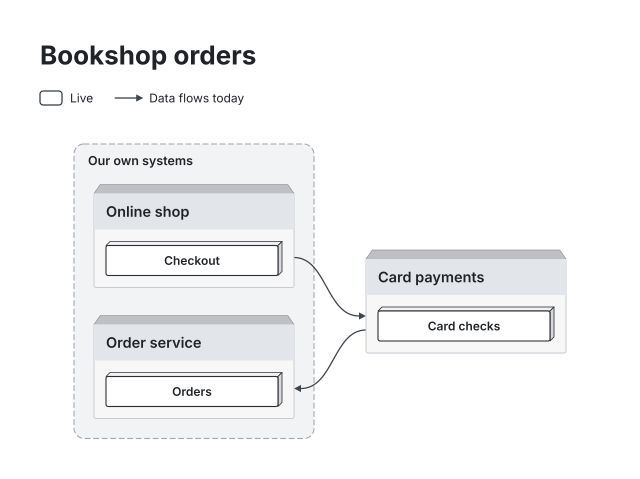
The check: 0 layout problems
The line from pay back to orders now runs right to left, so it takes auto sides. Without them, the check reports that the line leaves pay facing away from orders.